API Tokens
Administration
API tokens let you access the NOB.center API from scripts, CI pipelines, or third-party integrations without using your account credentials. Each token carries an explicit set of permissions and has a hard expiry date.
Navigate to Administration → API Tokens to manage your tokens.
Token roles
Two roles control who can manage tokens in an organization:
| Role | What it allows |
|---|---|
| Token Manager | Create tokens, view your own tokens, revoke your own tokens |
| Token Admin | All Token Manager permissions, plus view and revoke all tokens in the organization |
Token Admin is typically reserved for administrators who need to audit or clean up tokens created by other users.
Creating a token
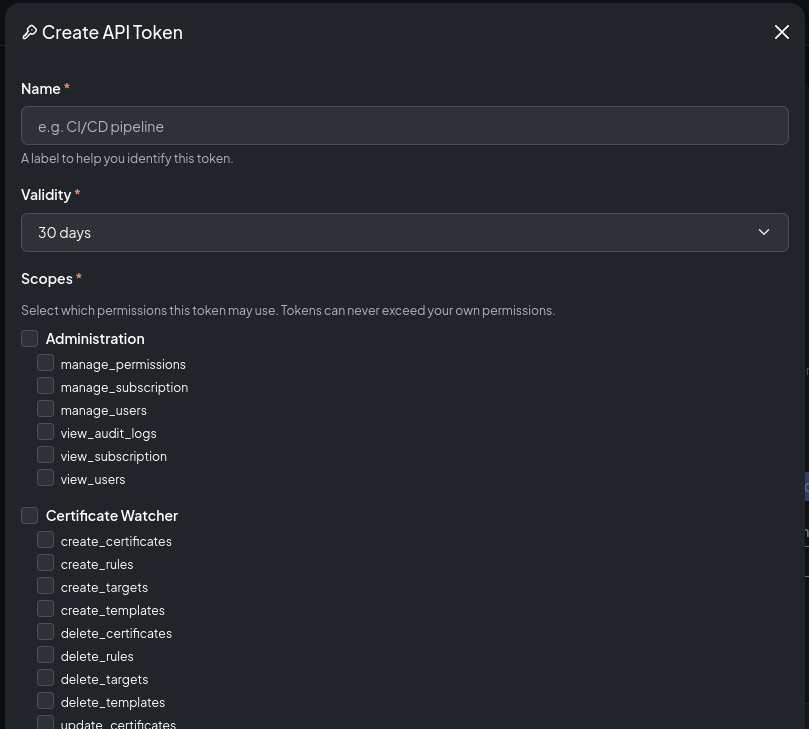
Click Create Token and fill in the form:
| Field | Description |
|---|---|
| Name | A human-readable label, e.g. grafana-integration or deploy-pipeline |
| Validity | How many days the token is valid (1–30 days) |
| Permissions | One or more individual permission scopes |
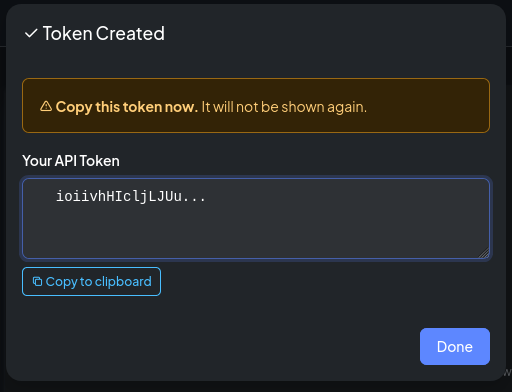
After clicking Create, the full token value is displayed once. Copy it immediately — it cannot be retrieved again. NOB.center stores only a hash of the token.
Permission scopes
Tokens use individual permissions, not roles. You select exactly which operations the token is allowed to perform. The format is module-name:permission_name.
Monitoring modules use the same permission names under different module scopes:
| Scope | What it permits |
|---|---|
ct-log:view_monitoring |
Read CT filters and certificate matches |
ct-log:create_monitoring |
Create CT filters |
ct-log:update_monitoring |
Edit CT filters |
ct-log:delete_monitoring |
Delete CT filters |
dns-watcher:view_monitoring |
Read monitored DNS domains, records, and history |
dns-watcher:create_monitoring |
Add DNS domains or records |
dns-watcher:update_monitoring |
Edit or toggle DNS domains or records |
dns-watcher:delete_monitoring |
Remove DNS domains or records |
rdap:view_monitoring |
Read RDAP monitors, snapshots, history, and diffs |
rdap:create_monitoring |
Add RDAP monitors |
rdap:update_monitoring |
Edit or toggle RDAP monitors |
rdap:delete_monitoring |
Delete RDAP monitors |
cert-watcher:view_monitoring |
Read certificate monitors, targets, scan results, and history |
cert-watcher:create_monitoring |
Create certificate monitors and targets |
cert-watcher:update_monitoring |
Edit or toggle certificate monitors and targets |
cert-watcher:delete_monitoring |
Delete certificate monitors and targets |
Alert rules and templates are scoped to their owning module:
| Scope pattern | What it permits |
|---|---|
<module>:view_alerts |
Read alert history for that module |
<module>:view_alert_rules |
Read alert rules for that module |
<module>:create_alert_rules |
Create alert rules for that module |
<module>:update_alert_rules |
Edit or toggle alert rules for that module |
<module>:delete_alert_rules |
Delete alert rules for that module |
<module>:view_alert_templates |
Read alert templates for that module |
<module>:create_alert_templates |
Create alert templates for that module |
<module>:update_alert_templates |
Edit or toggle alert templates for that module |
<module>:delete_alert_templates |
Delete alert templates for that module |
Replace <module> with ct-log, dns-watcher, rdap, or cert-watcher. For example, ct-log:update_alert_rules does not grant access to DNS alert rules; DNS alert rules require dns-watcher:update_alert_rules.
Administration scopes
| Scope | What it permits |
|---|---|
admin:view_users |
List organization members |
admin:manage_users |
Invite, edit, and remove users |
admin:manage_permissions |
Change role assignments |
admin:view_audit_logs |
Read the audit log |
admin:view_subscription |
View subscription status |
admin:manage_subscription |
Manage subscription and billing |
API token management scopes
| Scope | What it permits |
|---|---|
api-tokens:view_own_tokens |
List your own tokens |
api-tokens:create_tokens |
Create new tokens |
api-tokens:delete_tokens |
Revoke your own tokens |
api-tokens:view_all_tokens |
View all tokens in the organization |
api-tokens:revoke_all_tokens |
Revoke any token in the organization |
Using a token
Pass the token as a Bearer header on every API request:
curl -H "Authorization: Bearer nob_<your-token>" \
     https://app.nob.center/api/ct-log/filters
A request with a missing or invalid token returns 401. A request with a valid token that lacks the required permission returns 403.
Token expiry and renewal
Every token has a hard expiry set at creation. After expiry the token is automatically rejected — it cannot be used even if it was never used before.
To extend a token's lifetime, call the renew endpoint using the token itself as the authentication credential. The token must not yet be expired. The new expiry is calculated from today using the same validity period as when the token was originally created.
curl -X POST \
     -H "Authorization: Bearer nob_<your-token>" \
     https://app.nob.center/api/api-tokens/<token-id>/renew
Revoking a token
Click Revoke next to any token in the list to permanently invalidate it. Revocation is immediate and cannot be undone.
Token Admins can revoke tokens created by any user in the organization.
API reference
GET /api/api-tokens
List your own tokens (non-sensitive — does not return the raw token value).
Permission: view_own_tokens
Response:
{
  "tokens": [
    {
      "id": 1,
      "name": "deploy-pipeline",
      "token_prefix": "nob_abc123x",
      "scopes": ["ct-log:view_monitoring", "ct-log:view_alerts"],
      "expires_at": "2026-02-14T00:00:00Z",
      "last_used_at": "2026-01-15T09:45:00Z",
      "created_at": "2026-01-15T00:00:00Z",
      "revoked_at": null
    }
  ]
}
GET /api/api-tokens/org
List all tokens for the organization.
Permission: view_all_tokens
POST /api/api-tokens
Create a new token.
Permission: create_tokens
Body:
| Field | Type | Required | Description |
|---|---|---|---|
name |
string | Yes | Human-readable label |
validity_days |
int | Yes | 1–30 |
scopes |
list | Yes | Array of "module:permission" strings |
Response:
{
  "id": 1,
  "token": "nob_abc123xyz...",
  "name": "deploy-pipeline",
  "expires_at": "2026-02-14T00:00:00Z",
  "message": "Token created. Copy it now — it will not be shown again."
}
DELETE /api/api-tokens/{token_id}
Revoke a token.
Permission: delete_tokens (own tokens) or revoke_all_tokens (any token)
Response: {"message": "Token revoked"}
POST /api/api-tokens/{token_id}/renew
Renew a token. Must be authenticated using the token being renewed.
Permission: Token must be valid and not yet expired.
Response: {"message": "Token renewed", "expires_at": "2026-03-15T00:00:00Z"}