Certificate Deployment Monitoring
Monitoring Module Cert
Certificate Deployment Monitoring scans your TLS endpoints directly and reports on the certificate currently being served. Unlike CT-Log monitoring — which watches for certificates being issued — this module verifies what is actually deployed on your servers: expiry, protocol versions, cipher suites, and chain validity.
How it works
- You create a certificate monitor for a hostname (Common Name).
- You attach one or more IP targets — the server addresses to scan for that hostname.
- NOB.center connects to each target over TLS on the configured port, performs a full handshake, and records the certificate chain, protocols, and ciphers accepted by the server.
- Your alert rules evaluate each scan result and dispatch notifications if conditions are met.
- A scan history is stored for every target so you can track how the certificate evolves over time.
Certificate monitors
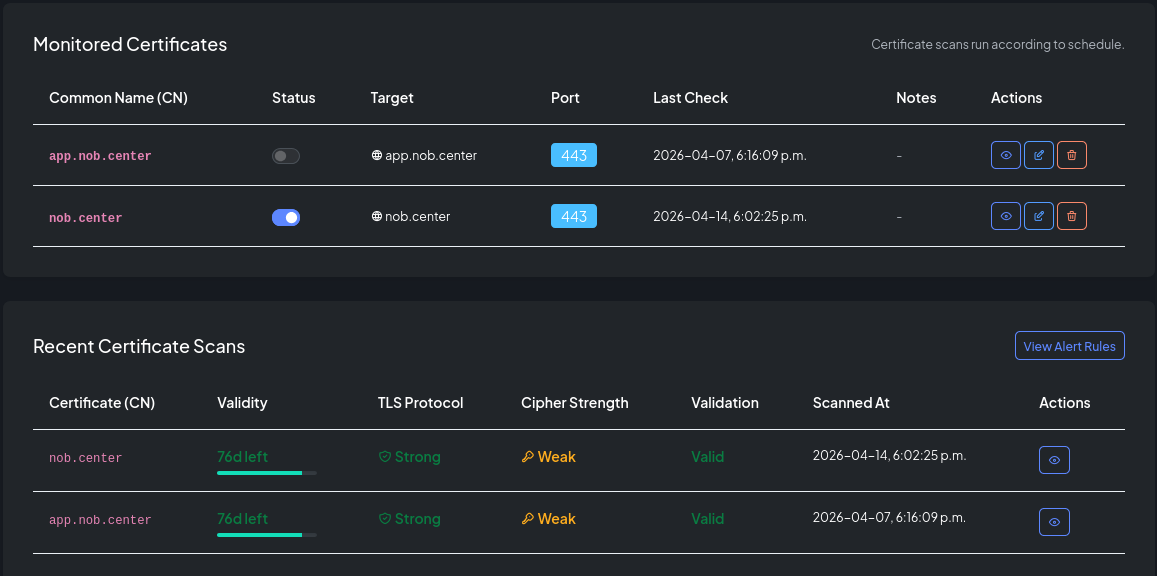
A monitor represents the hostname (CN) you expect to find on the certificate. One monitor can have multiple IP targets — for example, all servers behind a load balancer, or both IPv4 and IPv6 addresses.
Creating a monitor
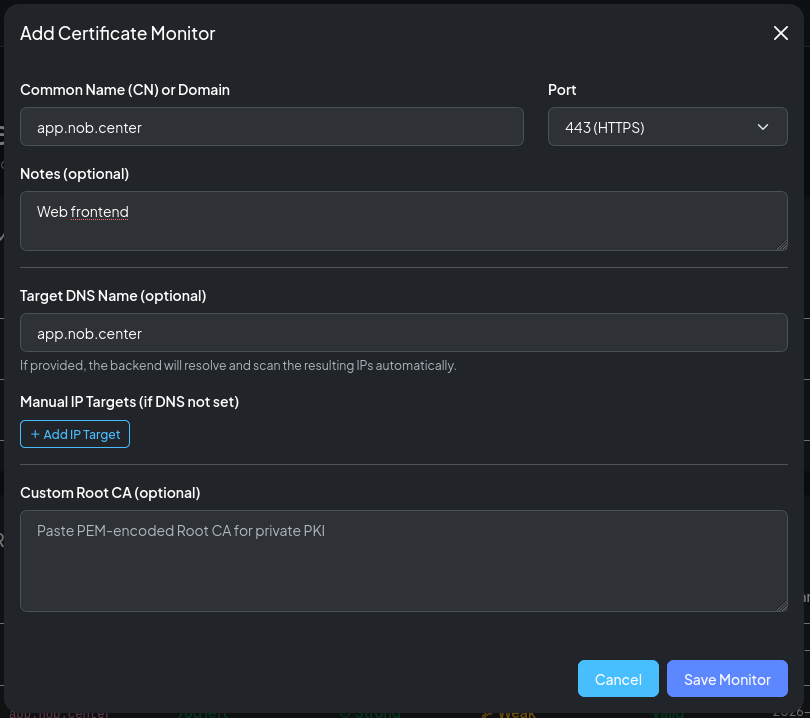
Navigate to Certificate Deployment and click Add Monitor. Fill in:
| Field | Description |
|---|---|
| Common Name (CN) | The hostname the certificate should be issued for (e.g. app.example.com) |
| Port | TCP port to connect to (default 443) |
| Target DNS | Optional DNS name to resolve for the target (overrides IP-based scanning for SNI) |
| Notes | Free-text label |
| Root CA | Optional PEM-encoded root certificate to use for chain validation |
Custom root CA for self-signed certificates
By default NOB.center validates the certificate chain against the system trust store. If your server presents a self-signed certificate or a certificate signed by a private CA (common in internal infrastructure, staging environments, or IoT devices), chain validation would fail and every scan would report an error.
To monitor these endpoints, paste the PEM-encoded root CA certificate into the Root CA field when creating or editing the monitor. NOB.center will use it as the trust anchor for chain validation, allowing the scan to complete successfully and report on expiry, protocols, and ciphers as normal.
Note
Providing a custom root CA does not suppress the self_signed detection in alert rules — certificate.subject == certificate.issuer still evaluates correctly. It only tells the scanner to trust that root when building the chain.
After creating the monitor, add one or more IP targets.
IP targets
Each IP target is an IP address that will be scanned for the monitor's CN. The scanner connects to <ip>:<port>, sends the CN as the TLS SNI extension, and inspects the certificate returned.
You can add multiple targets to cover: - All nodes in a cluster - IPv4 and IPv6 addresses - Primary and backup servers
Scan results
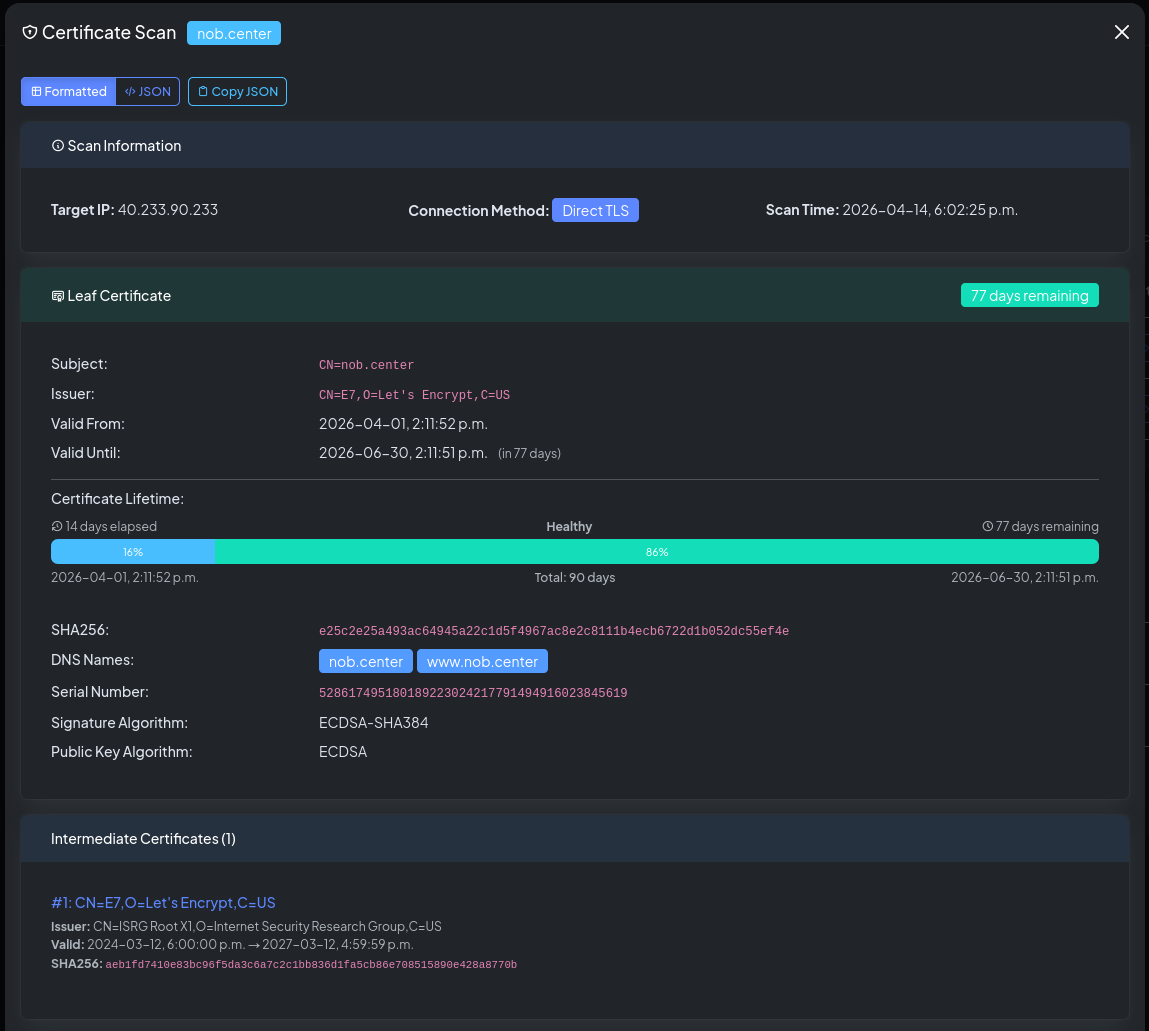
Each scan records:
| Field | Description |
|---|---|
| IP address | The target that was scanned |
| Certificate subject | The Common Name of the leaf certificate |
| Issuer | The CA that issued the certificate |
| Valid from / until | Certificate validity period |
| Days remaining | Days until the certificate expires |
| TLS protocols accepted | All TLS versions the server accepted |
| Cipher suites | Full list of TLS cipher suites offered |
| Named groups | Elliptic curve / DH groups advertised |
| Chain length | Number of certificates in the chain |
| Connection method | direct_tls (port 443/8443) or starttls (mail servers) |
| Scan status | Success or error |
Security framework analysis
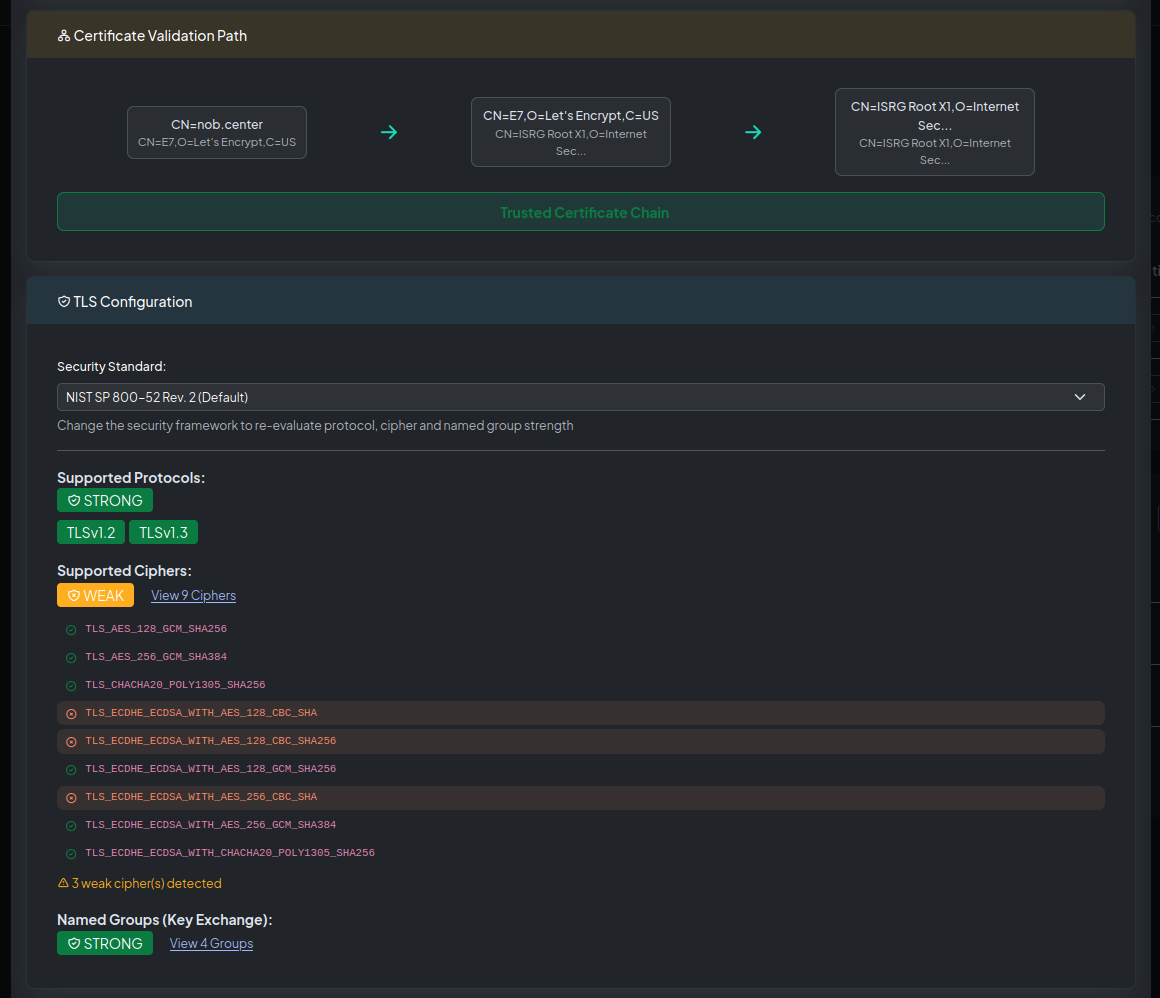
The scan detail view shows a Framework Analysis panel. NOB.center evaluates the observed TLS configuration against several industry standards and flags compliance gaps:
| Framework | Checks |
|---|---|
| FIPS 140-3 | Approved cipher suites and key exchange algorithms |
| NIST SP 800-52 | TLS version requirements and cipher recommendations |
| PCI-DSS v4 | Prohibition of TLS 1.0 and weak ciphers |
| Mozilla Intermediate | Mozilla's recommended compatible TLS profile |
| Mozilla Modern | Mozilla's stricter TLS 1.3-only profile |
Alert rules
Navigate to Certificate Deployment → Alert Rules to create and manage rules for this module.
CEL context object
Each scan result exposes the following fields to your CEL conditions:
{
  "monitor_cn": "app.example.com",
  "dns_name": "app.example.com",
  "ip_address": "93.184.216.34",
  "connection_method": "direct_tls",
  "protocol": ["TLSv1.2", "TLSv1.3"],
  "ciphers": [
    "TLS_AES_256_GCM_SHA384",
    "TLS_CHACHA20_POLY1305_SHA256",
    "TLS_ECDHE_RSA_WITH_AES_256_GCM_SHA384"
  ],
  "named_groups": ["X25519", "P-256"],
  "certificate": {
    "sha256": "a1b2c3d4e5f6...",
    "subject": "CN=app.example.com",
    "issuer": "CN=R10, O=Let's Encrypt, C=US",
    "dns_names": ["app.example.com", "www.example.com"],
    "not_before": "2026-01-01T00:00:00Z",
    "not_after": "2026-04-01T00:00:00Z",
    "serial": "12345678901234567890",
    "signature_algorithm": "SHA256-RSA",
    "public_key_algorithm": "RSA",
    "aia": "http://r10.i.lencr.org/",
    "ocsp": "http://r10.o.lencr.org/"
  },
  "validity_days": 75,
  "intermediates": [
    {
      "subject": "CN=R10, O=Let's Encrypt, C=US",
      "issuer": "CN=ISRG Root X1, O=Internet Security Research Group, C=US",
      "not_before": "2023-03-17T16:00:00Z",
      "not_after": "2027-03-13T23:59:59Z",
      "signature_sha256": "b2c3d4..."
    }
  ],
  "validation_path": [
    { "certificate_subject": "CN=app.example.com", "certificate_issuer": "CN=R10, O=Let's Encrypt, C=US" },
    { "certificate_subject": "CN=R10, O=Let's Encrypt, C=US", "certificate_issuer": "CN=ISRG Root X1, ..." }
  ],
  "has_error": false,
  "error": ""
}
Top-level fields
| Field | Type | Description |
|---|---|---|
monitor_cn |
string | Common Name configured for the monitor |
dns_name |
string | DNS hostname used for SNI (may be empty for IP-only monitors) |
ip_address |
string | IP address that was scanned |
connection_method |
string | direct_tls or starttls |
protocol |
list | TLS versions accepted by the server |
ciphers |
list | TLS cipher suites offered (IANA names) |
named_groups |
list | Elliptic curve / DH groups advertised |
certificate |
object | Leaf certificate details |
validity_days |
int | Days until the certificate expires; negative if already expired |
intermediates |
list | Intermediate certificates in the chain |
validation_path |
list | Certificate chain from leaf to trust anchor |
has_error |
bool | true if the scan failed entirely |
error |
string | Error message; empty on success |
certificate fields
| Field | Type | Description |
|---|---|---|
sha256 |
string | SHA-256 fingerprint of the leaf certificate |
subject |
string | Subject distinguished name |
issuer |
string | Issuer distinguished name |
dns_names |
list | Subject Alternative Names (SANs) |
not_before |
string | Validity start (RFC 3339) |
not_after |
string | Expiry date (RFC 3339) |
serial |
string | Serial number |
signature_algorithm |
string | e.g. SHA256-RSA, ECDSA-SHA384 |
public_key_algorithm |
string | RSA or ECDSA |
aia |
string | CA Issuers URL from AIA extension |
ocsp |
string | OCSP responder URL |
intermediates fields
| Field | Type | Description |
|---|---|---|
subject |
string | Subject DN of the intermediate |
issuer |
string | Issuer DN of the intermediate |
not_before |
string | RFC 3339 validity start |
not_after |
string | RFC 3339 validity end |
signature_sha256 |
string | SHA-256 fingerprint |
Example rules
Certificate expiring within 30 days:
!has_error && validity_days < 30
Certificate already expired:
!has_error && validity_days < 0
Scan failed (connection refused, TLS error):
has_error
TLS 1.0 or 1.1 accepted (deprecated):
!has_error && protocol.exists(p, p == "TLSv1" || p == "TLSv1.1")
TLS 1.3 not supported:
!has_error && !protocol.exists(p, p == "TLSv1.3")
Weak cipher suite offered (RC4, DES, 3DES, NULL):
!has_error && ciphers.exists(c, c.contains("RC4") || c.contains("_DES_") || c.contains("3DES") || c.contains("NULL"))
No forward secrecy:
!has_error && !ciphers.exists(c, c.contains("DHE") || c.contains("ECDHE"))
Self-signed certificate:
!has_error && certificate.subject == certificate.issuer
Wildcard certificate:
!has_error && certificate.dns_names.exists(d, d.startsWith("*."))
SHA-1 signature (deprecated):
!has_error && certificate.signature_algorithm.contains("SHA1")
Missing OCSP responder:
!has_error && certificate.ocsp == ""
Incomplete chain (no intermediates):
!has_error && intermediates.size() == 0
CN mismatch (certificate not valid for the monitored hostname):
!has_error && !certificate.dns_names.exists(d, d == monitor_cn)
API reference
All Certificate Deployment endpoints require authentication. See Authentication.
GET /api/cert-watcher/monitors
List your organization's certificate monitors.
Permission: view_monitoring
Query parameters: limit (int, default 10, max 100), offset (int, default 0), sort_by (cn, enabled, target, port, last_scan_time, created_at; default cn), sort_order (asc/desc, default asc)
Response:
{
  "monitors": [
    {
      "id": 1,
      "cn": "app.example.com",
      "enabled": true,
      "port": 443,
      "target_dns": null,
      "notes": "Production API",
      "created_at": "2026-01-01T00:00:00Z",
      "last_scan_time": "2026-01-15T10:00:00Z",
      "last_scan": {
        "scan_time": "2026-01-15T10:00:00Z",
        "targets": []
      },
      "indicators": {
        "validity_status": "good",
        "protocol_status": "good",
        "cipher_status": "good",
        "validation_status": "complete",
        "error_count": 0,
        "target_count": 1,
        "min_days_left": 75
      }
    }
  ],
  "total": 1,
  "limit": 10,
  "offset": 0,
  "sort_by": "cn",
  "sort_order": "asc"
}
GET /api/cert-watcher/recent-scans
List recently scanned certificate monitors, ordered by latest scan time. This is the endpoint used by the recent scans table so the browser does not have to fetch every monitor and sort locally.
Permission: view_monitoring
Query parameters: limit (int, default 10, max 100), offset (int, default 0), sort_by (cn, validity, protocol, cipher, validation, last_scan_time; default last_scan_time), sort_order (asc/desc, default desc)
Response: {"scans": [...], "total": 1, "limit": 10, "offset": 0, "sort_by": "last_scan_time", "sort_order": "desc"}
GET /api/cert-watcher/monitors/{monitor_id}
Get details for a single monitor, including its IP targets.
Permission: view_monitoring
POST /api/cert-watcher/monitors
Create a new certificate monitor.
Permission: create_monitoring
Body:
| Field | Type | Required | Description |
|---|---|---|---|
cn |
string | Yes | Common Name (hostname) |
port |
int | No | Default 443 |
target_dns |
string | No | Override DNS name for SNI |
enabled |
bool | No | Default true |
notes |
string | No | — |
root_ca |
string | No | PEM-encoded root certificate |
ip_addresses |
list | No | Initial list of IP targets to add |
Response: {"id": 1, "message": "Monitor created", "quota_remaining": 9}
PUT /api/cert-watcher/monitors/{monitor_id}
Replace all settings of an existing monitor.
Permission: update_monitoring
Response: {"message": "Monitor updated"}
PATCH /api/cert-watcher/monitors/{monitor_id}
Toggle enabled/disabled state.
Permission: update_monitoring
Body: {"enabled": false}
Response: {"message": "Monitor updated"}
DELETE /api/cert-watcher/monitors/{monitor_id}
Delete a certificate monitor and all its targets.
Permission: delete_monitoring
Response: {"message": "Monitor deleted"}
GET /api/cert-watcher/history/{monitor_id}
Get scan history for a monitor, with framework-based strength analysis per result.
Permission: view_monitoring
Query parameters: page (int, default 1), page_size (int, default 20)
Response: List of scan result objects, each including protocol/cipher data and framework compliance flags.
GET /api/cert-watcher/security-standards
Return the full definitions of the supported security standards (FIPS, NIST, PCI-DSS, Mozilla).
Permission: view_monitoring
GET /api/cert-watcher/ct-log-list
Return the current list of known CT logs (sourced from Google's public log list, cached 24 hours). Useful for cross-referencing SCTs.
Permission: view_monitoring
GET /api/cert-watcher/introspection
Returns the CEL variable schema for this module, used by the rule editor's Available fields dropdown.
Permission: view_alert_rules