RDAP / WHOIS Monitoring
Monitoring Module RDAP
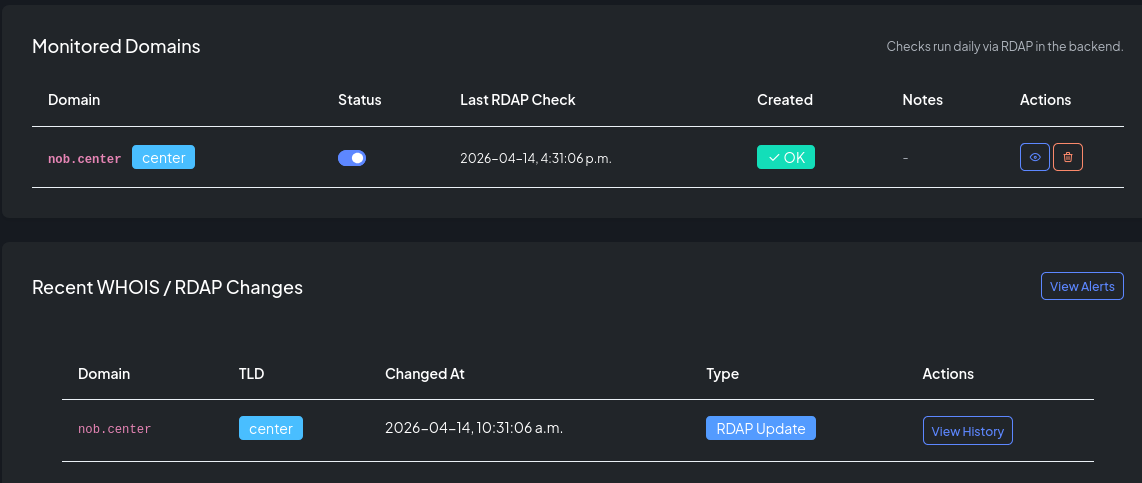
RDAP monitoring watches the registration data for your domains and alerts you whenever it changes. This covers nameservers, domain status flags, expiration dates, registrar, and registrant information — anything returned by the RDAP protocol for the domain's registry.
How it works
- You add a domain to RDAP monitoring.
- NOB.center queries the authoritative RDAP server for that domain on a regular schedule.
- When the response differs from the last stored snapshot, a change event is generated.
- Your alert rules evaluate each change and dispatch notifications if conditions are met.
- Full snapshots are stored so you can view diffs and trace changes over time.
Adding a domain
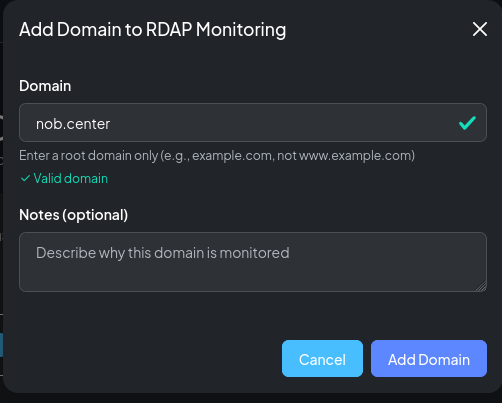
Navigate to RDAP / WHOIS and click Add Domain. Enter the fully-qualified domain name. NOB.center resolves the correct RDAP server for the domain's TLD automatically.
Domain settings
| Field | Description |
|---|---|
| Domain name | Fully-qualified domain (e.g. example.com) |
| Enabled | Toggle to pause monitoring without deleting the entry |
| Notes | Free-text label visible in the domain list |
Reading snapshots and diffs
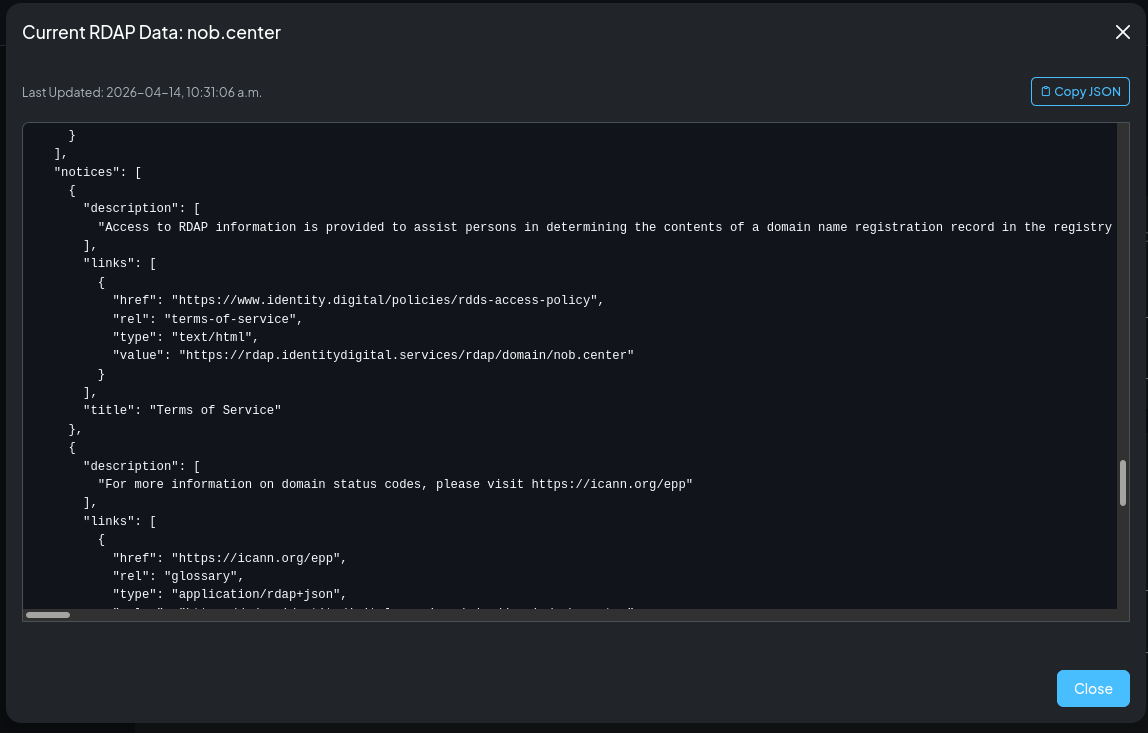
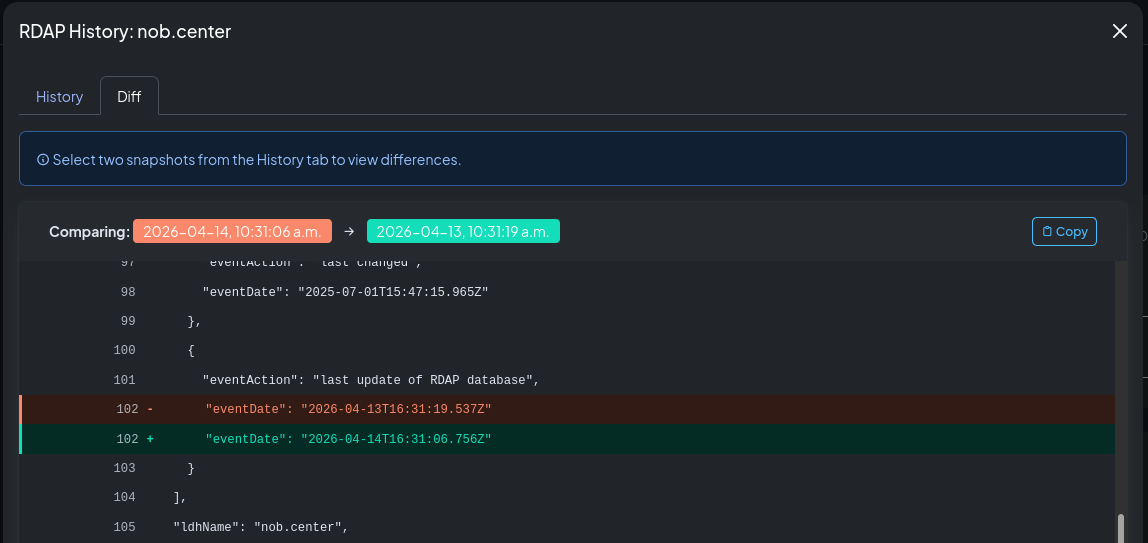
Click any domain to open its detail page. The History tab shows a timestamped list of all snapshots. Click any snapshot to see its full RDAP JSON, or select two snapshots to compare them side by side.
The diff highlights which fields changed between the two snapshots, making it easy to see exactly what was added, removed, or modified.
RDAP data availability by registry
RDAP is the modern replacement for WHOIS. Most registries have fully deployed RDAP, but the amount of data they expose varies significantly.
High-privacy registries
Some registries restrict what they publish via RDAP, either by policy or regulation. The most common example is DENIC (the .de registry), which returns minimal information — typically just the domain name, status, and nameservers — and omits registrant and contact data.
If your domain is under a high-privacy TLD, your RDAP snapshots will reflect what the registry publishes. Alerts based on registrant or entity fields may not fire because those fields are not present.
Checking what your registry returns
To see the exact JSON object your domain's RDAP server returns, you can query it directly:
# Using curl (replace with your RDAP server URL)
curl https://rdap.verisign.com/com/v1/domain/example.com | python3 -m json.tool

# For .de domains
curl https://rdap.denic.de/domain/example.de | python3 -m json.tool

# For .org domains
curl https://rdap.publicinterestregistry.org/rdap/domain/example.org | python3 -m json.tool
The NOB.center snapshot viewer shows the same JSON object. Navigate to your domain's history and open any snapshot to see the full response.
Finding your RDAP server
RDAP server URLs are published in the IANA RDAP Bootstrap file. You can look up your TLD's RDAP server at:
curl https://data.iana.org/rdap/dns.json | python3 -c "
import json, sys
data = json.load(sys.stdin)
tld = 'com'   # change to your TLD
for service in data['services']:
    if tld in service[0]:
        print(service[1])
"
Alert rules
Navigate to RDAP / WHOIS → Alert Rules to create and manage rules for this module.
CEL context object
Each RDAP change event exposes the following fields to your CEL conditions:
{
  "domain": "example.com",
  "tld": "com",
  "rdap": {
    "current": {
      "ldhName": "example.com",
      "status": ["client transfer prohibited", "active"],
      "nameservers": [
        { "ldhName": "ns1.example.com" },
        { "ldhName": "ns2.example.com" }
      ],
      "events": [
        { "eventAction": "registration", "eventDate": "2010-01-01T00:00:00Z" },
        { "eventAction": "expiration", "eventDate": "2027-01-01T00:00:00Z" },
        { "eventAction": "last changed", "eventDate": "2026-01-10T12:00:00Z" }
      ],
      "entities": [
        {
          "roles": ["registrar"],
          "vcardArray": [["version", {}, "text", "4.0"], ["fn", {}, "text", "Example Registrar Inc."]]
        }
      ]
    },
    "previous": {
      "ldhName": "example.com",
      "status": ["client transfer prohibited", "active"],
      "nameservers": [
        { "ldhName": "ns1.old-provider.com" },
        { "ldhName": "ns2.old-provider.com" }
      ],
      "events": [
        { "eventAction": "expiration", "eventDate": "2027-01-01T00:00:00Z" },
        { "eventAction": "last changed", "eventDate": "2025-06-01T08:00:00Z" }
      ],
      "entities": []
    }
  },
  "metadata": {
    "fetched_at": "2026-01-15T10:30:00Z",
    "rdap_server": "https://rdap.verisign.com/com/v1/",
    "http_status": 200
  }
}
Top-level fields
| Field | Type | Description |
|---|---|---|
domain |
string | Domain name being monitored |
tld |
string | Top-level domain |
rdap |
object | Contains current and previous RDAP snapshots |
metadata |
object | Query metadata |
rdap.current / rdap.previous
Both fields contain the full RDAP JSON response object as returned by the registry. The structure follows RFC 9083. Common fields:
| RDAP field | Type | Description |
|---|---|---|
ldhName |
string | Domain name (LDH form) |
status |
list | Domain status codes (e.g. client transfer prohibited) |
nameservers |
list | List of nameserver objects, each with ldhName |
events |
list | Timeline events with eventAction and eventDate |
entities |
list | Registrar, registrant, and contact objects |
metadata fields
| Field | Type | Description |
|---|---|---|
fetched_at |
string | ISO 8601 timestamp when the RDAP query ran |
rdap_server |
string | URL of the RDAP server queried |
http_status |
int | HTTP response status code from the RDAP server |
Example rules
Nameserver count changed:
rdap.current.nameservers.size() != rdap.previous.nameservers.size()
Domain status changed:
rdap.current.status != rdap.previous.status
Expiration date changed:
rdap.current.events.exists(e, e.eventAction == "expiration") &&
rdap.previous.events.exists(e, e.eventAction == "expiration") &&
rdap.current.events.filter(e, e.eventAction == "expiration")[0].eventDate !=
rdap.previous.events.filter(e, e.eventAction == "expiration")[0].eventDate
Registration data last changed (any update):
rdap.current.events.exists(e, e.eventAction == "last changed") &&
rdap.previous.events.exists(e, e.eventAction == "last changed") &&
rdap.current.events.filter(e, e.eventAction == "last changed")[0].eventDate !=
rdap.previous.events.filter(e, e.eventAction == "last changed")[0].eventDate
Registrant or registrar changed:
rdap.current.entities != rdap.previous.entities
RDAP query returned an error:
metadata.http_status >= 400
Domain queried via a specific registry:
metadata.rdap_server.contains("verisign")
API reference
All RDAP endpoints require authentication. See Authentication.
GET /api/rdap/domains
List your organization's monitored RDAP domains.
Permission: view_monitoring
Query parameters: limit (int, default 100, max 1000), offset (int, default 0), enabled (bool, optional), sort_by (domain_name, tld, enabled, last_checked_at, created_at; default domain_name), sort_order (asc/desc, default asc)
Response:
{
  "domains": [
    {
      "id": 1,
      "domain_name": "example.com",
      "enabled": true,
      "notes": "Primary domain",
      "last_checked_at": "2026-01-15T10:00:00Z",
      "last_check_status": "success",
      "created_at": "2026-01-01T00:00:00Z"
    }
  ],
  "total": 1,
  "limit": 100,
  "offset": 0,
  "sort_by": "domain_name",
  "sort_order": "asc"
}
GET /api/rdap/changes
List recent RDAP changes across all enabled monitored domains.
Permission: view_monitoring
Query parameters: limit (int, default 10, max 100), offset (int, default 0), sort_by (domain_name, tld, changed_at; default changed_at), sort_order (asc/desc, default desc)
Response:
{
  "changes": [
    {
      "domain_name": "example.com",
      "tld": "com",
      "changed_at": "2026-01-15T10:00:00Z",
      "previous_hash": "...",
      "current_hash": "..."
    }
  ],
  "total": 1,
  "limit": 10,
  "offset": 0,
  "sort_by": "changed_at",
  "sort_order": "desc"
}
POST /api/rdap/domains
Add a domain to RDAP monitoring.
Permission: create_monitoring
Body:
| Field | Type | Required | Description |
|---|---|---|---|
domain_name |
string | Yes | Fully-qualified domain name |
enabled |
bool | No | Default true |
notes |
string | No | — |
Response: {"id": 1, "message": "Domain added to RDAP monitoring", "quota_remaining": 9}
PATCH /api/rdap/domains/{monitor_id}
Update monitor settings (notes, enabled state).
Permission: update_monitoring
Response: {"message": "Monitor updated"}
DELETE /api/rdap/domains/{monitor_id}
Remove a domain from RDAP monitoring.
Permission: delete_monitoring
Response: {"message": "Monitor deleted"}
GET /api/rdap/domains/{domain}/history
Retrieve the snapshot history for a domain.
Permission: view_monitoring
Query parameters: limit (int, default 30)
Response:
{
  "domain": "example.com",
  "snapshots": [
    {
      "id": "...",
      "timestamp": "2026-01-15T10:00:00Z",
      "changed": true
    }
  ],
  "total": 8
}
GET /api/rdap/domains/{domain}/snapshot
Retrieve a specific snapshot by ID or timestamp.
Permission: view_monitoring
Query parameters: snapshot_id (string) or at (string, ISO 8601 timestamp)
Response: Full RDAP JSON snapshot object.
GET /api/rdap/domains/{domain}/diff
Compare two snapshots and return a structured diff.
Permission: view_monitoring
Query parameters: from (string, snapshot ID or timestamp), to (string, snapshot ID or timestamp)
Response: Structured diff object showing added, removed, and modified fields.
GET /api/rdap/introspection
Returns the CEL variable schema for this module, used by the rule editor's Available fields dropdown.
Permission: view_alert_rules