DNS Monitoring
Monitoring Module DNS
DNS Monitoring watches specified DNS records for your domains and alerts you whenever they change. You choose exactly which records to track — A, MX, NS, TXT, and more — and NOB.center notifies you whenever any value, TTL, or DNSSEC status changes.
How it works
- You add a domain to DNS monitoring and select which DNS records to watch.
- NOB.center checks those records on a regular schedule.
- When the current values differ from the last known snapshot, a change event is generated.
- Your alert rules evaluate each change and dispatch notifications if conditions are met.
- The full history of snapshots and diffs is available for review at any time.
Adding a domain
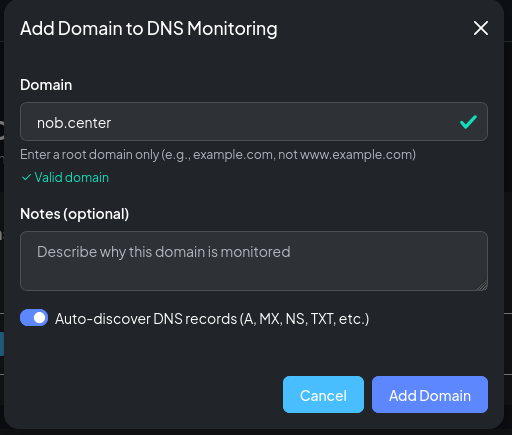
Navigate to DNS Monitoring and click Add Domain. Enter the domain name and choose whether to enable Auto-discover.
Auto-discover
When auto-discover is enabled, NOB.center probes the domain for common DNS record types on the first check and suggests a set of records to monitor. You can review the suggestions and accept or discard each one individually.
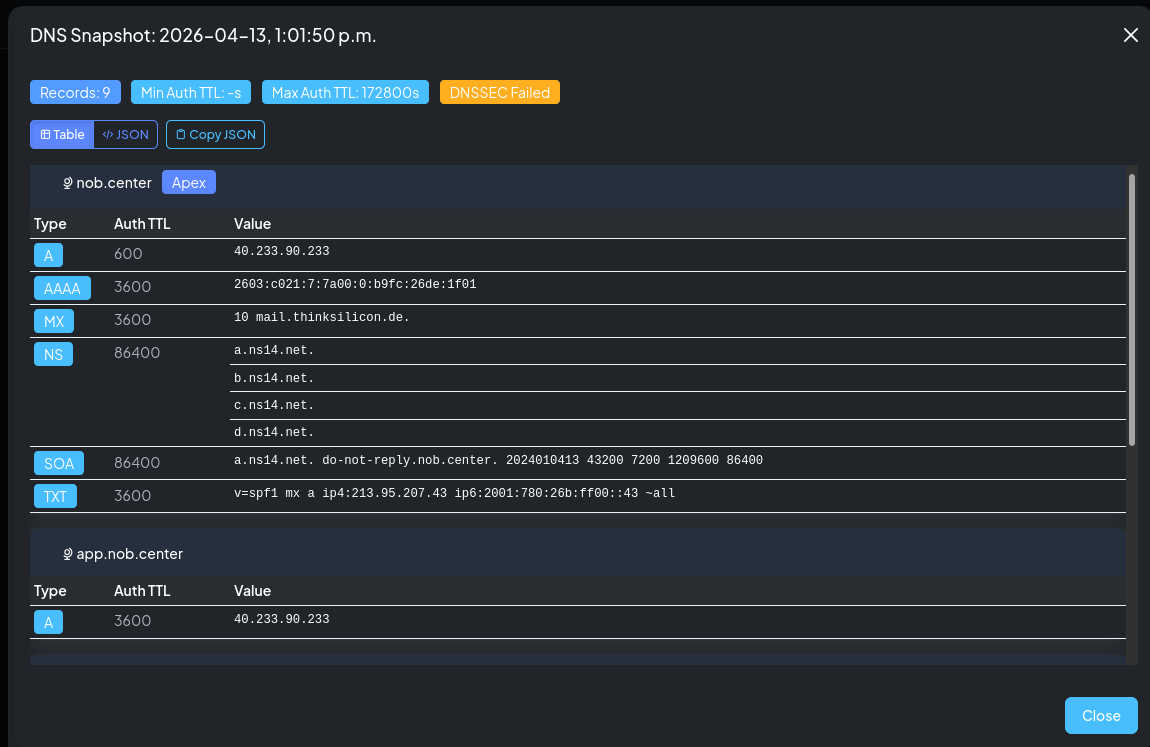
Auto-discover probes for: A, AAAA, MX, NS, TXT, CAA, SOA, CNAME, and common subdomains (www, mail, smtp, ftp, etc.).
As long as auto-discovery is enabled NOB.center will probe for these records daily and add as needed.
Domain settings
| Field | Description |
|---|---|
| Domain name | The fully-qualified domain to monitor (e.g. example.com) |
| Auto-discover | Whether to propose records automatically on first check |
| Enabled | Toggle to pause monitoring without deleting configuration |
| Notes | Free-text label visible in the domain list |

Managing DNS records
Open a domain to see its Records tab. Each row shows the record name, type, whether it is currently enabled, and how it was added (automatically or manually).
Record types
NOB.center monitors these DNS record types:
A · AAAA · MX · NS · TXT · CNAME · CAA · SOA · SRV · PTR
Enabling and disabling records
Toggle any record on or off individually. A disabled record is paused — it stops consuming quota and no alerts fire for it, but its history is preserved. You can re-enable it at any time.
Adding records manually
Click Add Record, enter a record name and type, and confirm. The record will be queried on the next scheduled check.
Removing records
Delete a record to remove it from monitoring entirely. Its history is retained for 30 days.
History and diffs
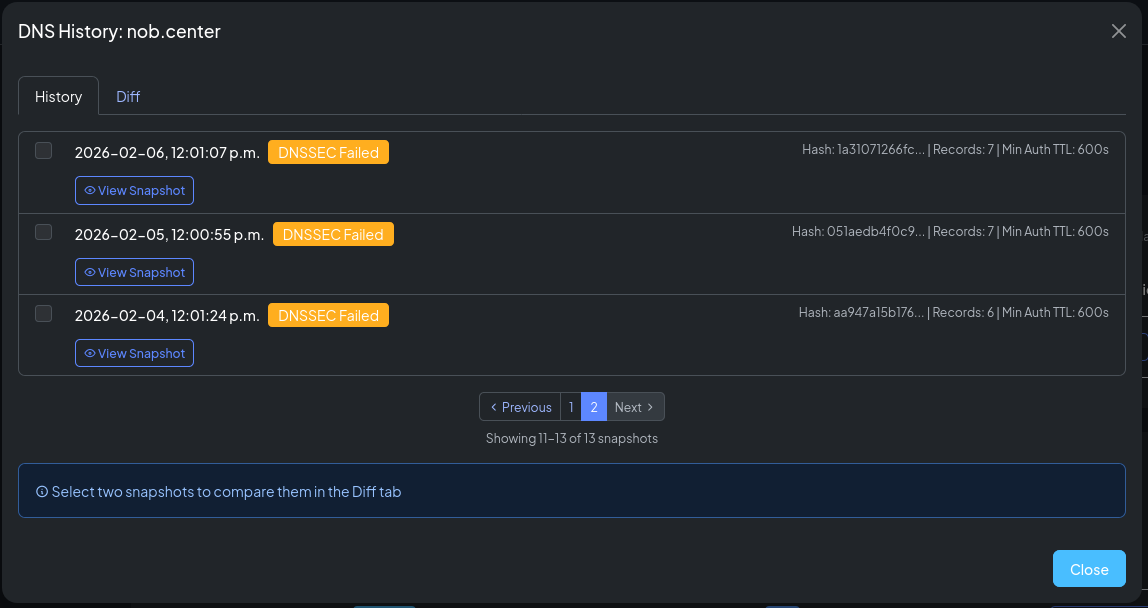
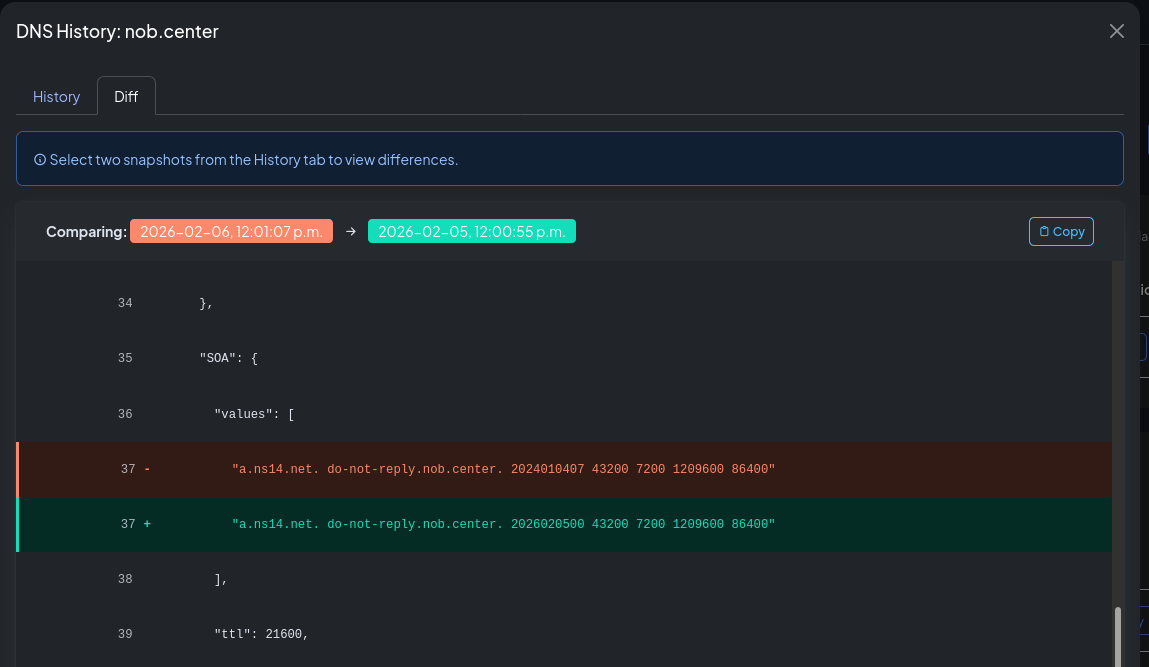
The History tab shows a timestamped list of snapshots taken for the domain. Click any two snapshots to see a side-by-side diff of what changed between them.
Each diff shows:
| Column | Description |
|---|---|
| Record | The DNS record name and type |
| Action | added, modified, or deleted |
| Old values | Previous record value(s) |
| New values | New record value(s) |
| TTL change | Old TTL → New TTL (in seconds) |
| DNSSEC status | Validation state at the time of the snapshot |
Alert rules
Navigate to DNS Monitoring → Alert Rules to create and manage rules for this module.
CEL context object
Each DNS change event exposes the following fields to your CEL conditions:
{
  "domain": "example.com",
  "tld": "com",
  "current": {
    "dns": {
      "example.com": {
        "@": {
          "A": { "values": ["93.184.216.34"], "ttl": 3600 },
          "NS": { "values": ["ns1.example.com", "ns2.example.com"], "ttl": 86400 },
          "MX": { "values": ["10 mail.example.com"], "ttl": 3600 }
        },
        "www": {
          "A": { "values": ["93.184.216.34"], "ttl": 3600 }
        }
      }
    }
  },
  "previous": {
    "dns": {
      "example.com": {
        "@": {
          "A": { "values": ["93.184.216.33"], "ttl": 3600 },
          "NS": { "values": ["ns1.example.com", "ns2.example.com"], "ttl": 86400 },
          "MX": { "values": ["10 mail.example.com"], "ttl": 3600 }
        }
      }
    }
  },
  "changed_records": [
    {
      "name": "@",
      "type": "A",
      "action": "modified",
      "old_values": ["93.184.216.33"],
      "new_values": ["93.184.216.34"],
      "old_ttl": 3600,
      "new_ttl": 3600,
      "dnssec_status": "validated"
    }
  ],
  "metadata": {
    "fetched_at": "2026-01-15T10:30:00Z",
    "nameserver": "8.8.8.8",
    "response_time_ms": 42,
    "query_status": "NOERROR",
    "record_count": 8,
    "dnssec_enabled": true,
    "dnssec_validated": true,
    "min_ttl": 300,
    "max_ttl": 86400
  }
}
Top-level fields
| Field | Type | Description |
|---|---|---|
domain |
string | Domain being monitored |
tld |
string | Top-level domain (e.g. com, org) |
current |
object | Current DNS snapshot |
previous |
object | Previous DNS snapshot |
changed_records |
list | Records that changed in this event |
metadata |
object | Query metadata |
current / previous structure
Both current.dns and previous.dns are maps keyed by domain name, then record name (@ for the apex), then record type. Each entry has values (list of strings) and ttl (int).
current.dns["example.com"]["@"]["A"].values.size()
current.dns["example.com"]["www"]["CNAME"].values[0]
previous.dns["example.com"]["@"]["NS"].values != current.dns["example.com"]["@"]["NS"].values
changed_records fields
| Field | Type | Description |
|---|---|---|
name |
string | Record name (@ for apex, www for www, etc.) |
type |
string | Record type: A, AAAA, MX, NS, TXT, CNAME, CAA, SOA, SRV, PTR |
action |
string | added, modified, or deleted |
old_values |
list | Previous record values |
new_values |
list | New record values |
old_ttl |
int | Previous TTL in seconds |
new_ttl |
int | New TTL in seconds |
dnssec_status |
string | validated, failed, or unsigned |
metadata fields
| Field | Type | Description |
|---|---|---|
fetched_at |
string | ISO 8601 timestamp when the check ran |
nameserver |
string | DNS resolver used for the query |
response_time_ms |
int | Query response time in milliseconds |
query_status |
string | DNS response code: NOERROR, NXDOMAIN, SERVFAIL, etc. |
record_count |
int | Total number of records in the snapshot |
dnssec_enabled |
bool | Whether DNSSEC is configured for the domain |
dnssec_validated |
bool | Whether DNSSEC validation passed |
min_ttl |
int | Lowest TTL across all records (seconds) |
max_ttl |
int | Highest TTL across all records (seconds) |
Example rules
Any A record changed:
changed_records.exists(r, r.type == "A")
Nameserver changed:
changed_records.exists(r, r.type == "NS")
MX record added (new mail provider):
changed_records.exists(r, r.type == "MX" && r.action == "added")
SPF record modified:
changed_records.exists(r, r.type == "TXT" && r.old_values.exists(v, v.startsWith("v=spf1")) && r.new_values.exists(v, v.startsWith("v=spf1")))
CAA records removed (security concern):
changed_records.exists(r, r.type == "CAA" && r.action == "deleted")
Nameserver pointing to parking service:
changed_records.exists(r, r.type == "NS" && r.new_values.exists(ns, ns.contains("parking") || ns.contains("sedo")))
Multiple records changed simultaneously:
changed_records.size() >= 3
DNSSEC validation failed:
metadata.dnssec_enabled && !metadata.dnssec_validated
TTL dropped below 5 minutes:
changed_records.exists(r, r.new_ttl < 300 && r.new_ttl != r.old_ttl)
DNS query returned error:
metadata.query_status != "NOERROR"
API reference
All DNS Monitoring endpoints require authentication. See Authentication.
GET /api/dns-watcher/domains
List your organization's monitored domains.
Permission: view_monitoring
Query parameters: limit (int, default 100, max 1000), offset (int, default 0), enabled (bool, optional), sort_by (domain_name, tld, enabled, record_count, last_check, dnssec, created_at; default domain_name), sort_order (asc/desc, default asc)
Response:
{
  "domains": [
    {
      "id": 1,
      "domain_name": "example.com",
      "enabled": true,
      "auto_discover": true,
      "notes": "Primary domain",
      "last_check": "2026-01-15T10:00:00Z",
      "last_check_status": "success",
      "record_count": 5,
      "created_at": "2026-01-01T00:00:00Z"
    }
  ],
  "total": 1,
  "limit": 100,
  "offset": 0,
  "sort_by": "domain_name",
  "sort_order": "asc"
}
GET /api/dns-watcher/changes
List recent DNS changes across all enabled monitored domains.
Permission: view_monitoring
Query parameters: limit (int, default 10, max 100), offset (int, default 0), sort_by (domain_name, tld, changed_at, record_count, min_ttl; default changed_at), sort_order (asc/desc, default desc)
Response:
{
  "changes": [
    {
      "domain_name": "example.com",
      "tld": "com",
      "changed_at": "2026-01-15T10:00:00Z",
      "previous_hash": "...",
      "current_hash": "...",
      "record_count": 5,
      "dnssec_validated": true,
      "min_ttl": 300
    }
  ],
  "total": 1,
  "limit": 10,
  "offset": 0,
  "sort_by": "changed_at",
  "sort_order": "desc"
}
POST /api/dns-watcher/domains
Add a domain to DNS monitoring.
Permission: create_monitoring
Body:
| Field | Type | Required | Description |
|---|---|---|---|
domain |
string | Yes | Fully-qualified domain name |
auto_discover |
bool | No | Default true |
enabled |
bool | No | Default true |
notes |
string | No | — |
Response: {"id": 1, "message": "Domain added to monitoring", "quota_remaining": 9}
PATCH /api/dns-watcher/domains/{monitor_id}
Update domain monitor settings (notes, enabled state, auto-discover).
Permission: update_monitoring
Response: {"message": "Domain monitor updated"}
DELETE /api/dns-watcher/domains/{monitor_id}
Remove a domain from DNS monitoring.
Permission: delete_monitoring
Response: {"message": "Domain removed from monitoring"}
GET /api/dns-watcher/domains/{domain_id}/records
List monitored DNS records for a domain. The records table uses this endpoint page-by-page, so large domains do not require downloading every configured record into the browser.
Permission: view_monitoring
Query parameters: limit (int, default 20, max 100), offset (int, default 0), sort_by (record_name, record_type, enabled, discovered_by, created_at; default record_type), sort_order (asc/desc, default asc)
Response:
{
  "records": [
    {
      "id": 10,
      "record_name": "@",
      "record_type": "A",
      "enabled": true,
      "discovered_by": "heuristic",
      "created_at": "2026-01-01T00:00:00Z"
    }
  ],
  "total": 5,
  "limit": 20,
  "offset": 0,
  "sort_by": "record_type",
  "sort_order": "asc"
}
POST /api/dns-watcher/domains/{domain_id}/records
Add a DNS record to monitor.
Permission: create_monitoring
Body:
| Field | Type | Required | Description |
|---|---|---|---|
record_name |
string | Yes | Record name, e.g. @, www, mail |
record_type |
string | Yes | One of: A, AAAA, MX, NS, TXT, CNAME, CAA, SOA, SRV, PTR |
Response: {"id": 11, "record_name": "www", "record_type": "A", "message": "DNS record added to monitoring"}
PATCH /api/dns-watcher/records/{record_id}
Enable or disable a DNS record.
Permission: update_monitoring
Body: {"enabled": false}
Response: {"message": "DNS record updated"}
DELETE /api/dns-watcher/records/{record_id}
Remove a DNS record from monitoring.
Permission: delete_monitoring
Response: {"message": "DNS record removed from monitoring"}
GET /api/dns-watcher/domains/{domain_name}/history
Retrieve the snapshot history for a domain.
Permission: view_monitoring
Query parameters: limit (int, default 30)
Response:
{
  "domain": "example.com",
  "snapshots": [
    {
      "id": "...",
      "timestamp": "2026-01-15T10:00:00Z",
      "changed": true,
      "change_summary": ["A record @ modified"]
    }
  ],
  "total": 12
}
GET /api/dns-watcher/introspection
Returns the CEL variable schema for this module, used by the rule editor's Available fields dropdown.
Permission: view_alert_rules