Alerting Model
Core Concepts
NOB.center's alert system is built around three components: rules, templates, and destinations. Understanding how they relate to each other makes it straightforward to build exactly the notification behaviour you want.
The three components
Rules
A rule is the condition side of an alert. It says: "when an event from this module matches this expression, fire an alert."
Each rule has:
- Name — a human-readable label
- Module — which monitoring module the rule applies to (CT-Log, DNS, RDAP, or Cert-Watcher)
- Condition — a CEL expression that evaluates to
trueorfalseagainst each incoming event - Severity —
low,medium,high, orcritical - Template — which template to use for dispatch (see below)
- Enabled toggle
Templates
A template is the delivery side of an alert. It says: "when a rule fires, send a notification here, formatted like this, at this frequency."
Each template has:
- Name — a human-readable label
- Frequency mode —
immediateorbatch - Destinations — one or more email addresses or webhook URLs
- Subject and body templates (for email destinations) — Go templates with access to event data
- Batch interval (batch mode only) — how often to send batched digests, in minutes (10–1440)
- Max batch size — cap on the number of events per batch
Destinations
A template sends to one destination — either an email address list or a webhook endpoint:
- Email destination
- Up to 5 email addresses. You can customise the subject and body using Go template syntax (see Email templates below).
- Webhook destination
- An HTTPS URL. NOB.center sends a POST (or PUT/PATCH) request with a JSON body. Optional authentication: Bearer token, HTTP Basic, or a custom header.
Frequency modes
Immediate
Every event that matches a rule generates one alert dispatch. This is the default and best for high-priority rules where you need to know immediately.
Batch
Events that match a rule are collected over a configurable interval (e.g., 60 minutes) and sent as a single digest. This is useful for rules that fire frequently — for example, "notify me of all new CT certificates in the past hour" rather than one email per certificate.
When the batch interval elapses or the max batch size is reached (whichever comes first), the collected events are dispatched.
Deduplication
Each template has a deduplication window (default: 24 hours). If the same event hash triggers the same rule within the dedup window, the duplicate is suppressed. This prevents alert storms if the same certificate or DNS change is re-processed.
The dedup window is configurable per template.
CEL expressions
Rules use the Common Expression Language (CEL) to describe conditions. CEL is a lightweight, safe expression language — it cannot execute arbitrary code or make network calls.
Basic syntax
# String comparisons
cert.subject.contains("example.com")
cert.issuer.startsWith("CN=Let's Encrypt")

# List membership
"*.example.com" in cert.dns_names

# Boolean fields
caa.authorized == false
has_error == true

# Numeric comparisons
validity_days < 30
rate.count > 5
Available functions
| Function | Example |
|---|---|
contains(s) |
cert.subject.contains("example") |
startsWith(s) |
cert.issuer.startsWith("CN=R10") |
endsWith(s) |
cert.subject.endsWith(".com") |
lowerAscii() |
cert.subject.lowerAscii().contains("test") |
in operator |
"example.com" in cert.dns_names |
in_list(value, list) |
in_list(ip_address, lists["maintenance_networks"]) |
size() |
size(cert.dns_names) > 5 |
Logical operators
Use && (AND), || (OR), ! (NOT), and parentheses for grouping:
cert.issuer.contains("Let's Encrypt") && !caa.authorized

(validity_days < 30 && validity_days > 0) || has_error
Module-specific variables
Each module exposes a different set of variables. Detailed field references are in each module's documentation:
- CT-Log CEL reference
- DNS CEL reference
- RDAP CEL reference
- Certificate Deployment CEL reference
- Rule Lists for reusable IP, CIDR, and exact-domain matching
Validating expressions
The rule editor validates your CEL expression as you type. You can also use the Validate button before saving. Basic checks include:
- Balanced parentheses and quotes
- No forbidden patterns (shell execution, imports)
- Syntax errors
Email templates
Email destinations let you customise both the subject line and body using Go template syntax. The template receives a data context that varies by module.
Common variables (all modules)
| Variable | Example value |
|---|---|
{{.RuleName}} |
"Unauthorized certificate detected" |
{{.Severity}} |
"high" |
{{.Timestamp}} |
"2026-01-15 10:30:00 UTC" |
{{.Organization}} |
"Acme Corp" |
CT-Log template variables
{{.Data.cert.subject}}          — certificate subject
{{.Data.cert.issuer}}           — issuer name
{{.Data.cert.dns_names}}        — list of SANs
{{.Data.cert.not_after}}        — expiry timestamp
{{.Data.caa.authorized}}        — true/false
{{.Data.rate.count}}            — matches in window
DNS template variables
{{.Data.domain}}                — e.g. "example.com"
{{.Data.tld}}                   — e.g. "com"
{{range .Data.changed_records}}
  {{.name}} {{.type}}: {{.old_values}} → {{.new_values}}
{{end}}
{{.Data.metadata.fetched_at}}
RDAP template variables
{{.Data.domain}}
{{.Data.rdap.current.ldhName}}         — domain name from RDAP
{{.Data.rdap.current.nameservers}}     — current nameservers
{{.Data.rdap.previous.nameservers}}    — previous nameservers
{{.Data.metadata.rdap_server}}
Certificate Deployment template variables
{{.Data.monitor_cn}}
{{.Data.ip_address}}
{{.Data.certificate.not_after}}
{{.Data.validity_days}}
{{.Data.has_error}}
{{.Data.error}}
Webhook payload
When a rule fires with a webhook destination, NOB.center sends a JSON object containing:
{
  "alert_id": 1234,
  "rule_name": "My rule",
  "severity": "high",
  "module": "ct-log",
  "timestamp": "2026-01-15T10:30:00Z",
  "organization": "Acme Corp",
  "event_data": { ... }
}
The event_data field contains the same module-specific JSON that your CEL expression evaluated — so you have access to the full event detail in your webhook handler.
Alert history
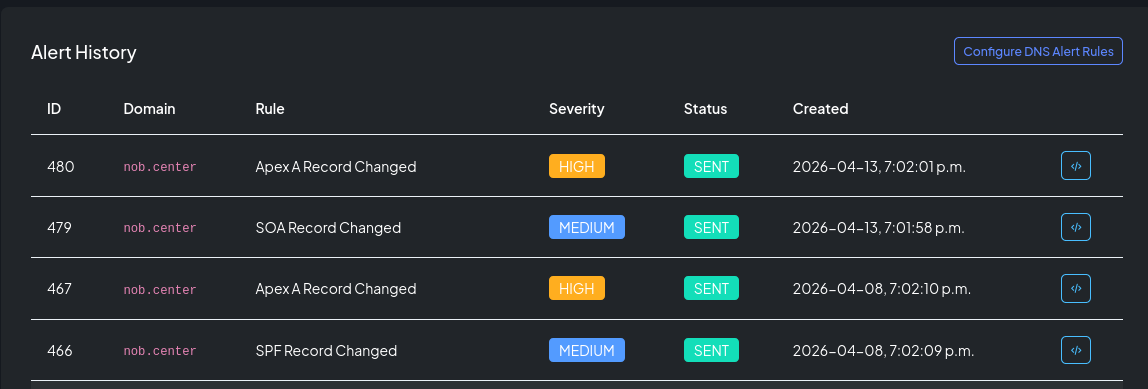
Every alert dispatch (whether successful or failed) is recorded in the alert history. You can access the history per module at [Module] → Alerts. Each entry shows:
- The rule and template that triggered
- The severity and timestamp
- The event data snapshot
- The dispatch status (pending, sent, or failed) and any error message