Typosquatting Detection
Certificate Transparency CT Log
Typosquatting detection is part of Certificate Transparency Monitoring. It reviews CT log certificates for lookalike domains based on protected domains you opt in from your CT filters.
Use it to catch review signals such as lookalike characters, domain label typos, affixes like support-, and a protected domain appearing under another public suffix.
Configure protected domains
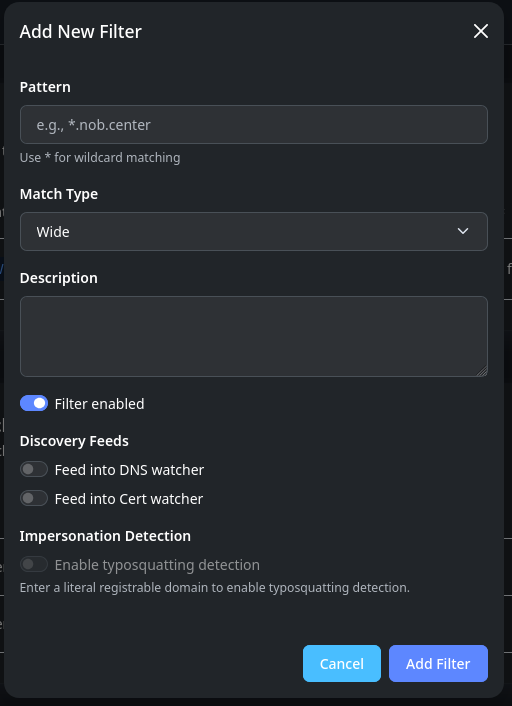
Typosquatting detection is enabled on a CT domain filter. Open Certificate Transparency -> Monitor and use Add Filter or Edit Filter to turn on Typosquatting Detection for the domain you want to protect.
The Typosquatting page itself is for review. Its Manage Filters action returns you to the Monitor page when you need to:
- add another protected domain
- turn detection on or off
- change the filter pattern or other CT filter settings
Filter eligibility
To be eligible, the filter pattern must name one concrete registrable domain: the domain you could register or own directly below a public suffix. For example, example.com and example.co.uk each identify one protected domain. The filter match type can still be wide or exact; eligibility is based on the pattern itself.
Patterns that describe a broader hostname set or a specific subdomain are not eligible. The detector compares CT candidates to the protected registrable domain, so it does not use wildcard filters, leading-dot filters, or filters with extra hostname labels such as login.example.com.
| Filter pattern | Typosquatting detection | Why |
|---|---|---|
example.com |
Available | Literal registrable domain |
example.co.uk |
Available | Literal registrable domain with a multi-label public suffix |
*.example.com |
Unavailable | Wildcard filter |
.example.com |
Unavailable | Leading-dot subdomain filter |
login.example.com |
Unavailable | Subdomain filter with an extra hostname label |
When a pattern is not eligible, the toggle is disabled in the filter form and the form shows the reason. Use broader CT filter shapes when you want normal certificate matches for subdomains. Add or edit a root-domain filter when you want lookalike-domain discovery for that protected domain.
Review filters and matches
Open Certificate Transparency -> Typosquatting to review lookalike domains found in CT logs for filters where detection is enabled.
The page has two sections:
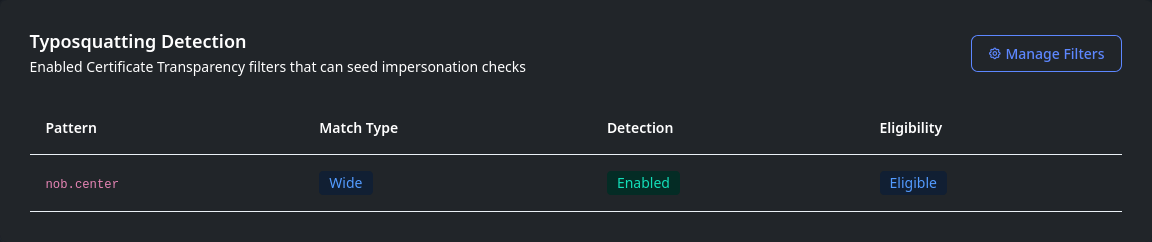
- Typosquatting Detection is a read-only overview of enabled CT filters. It shows which filters currently seed lookalike-domain checks and whether each filter pattern is eligible.
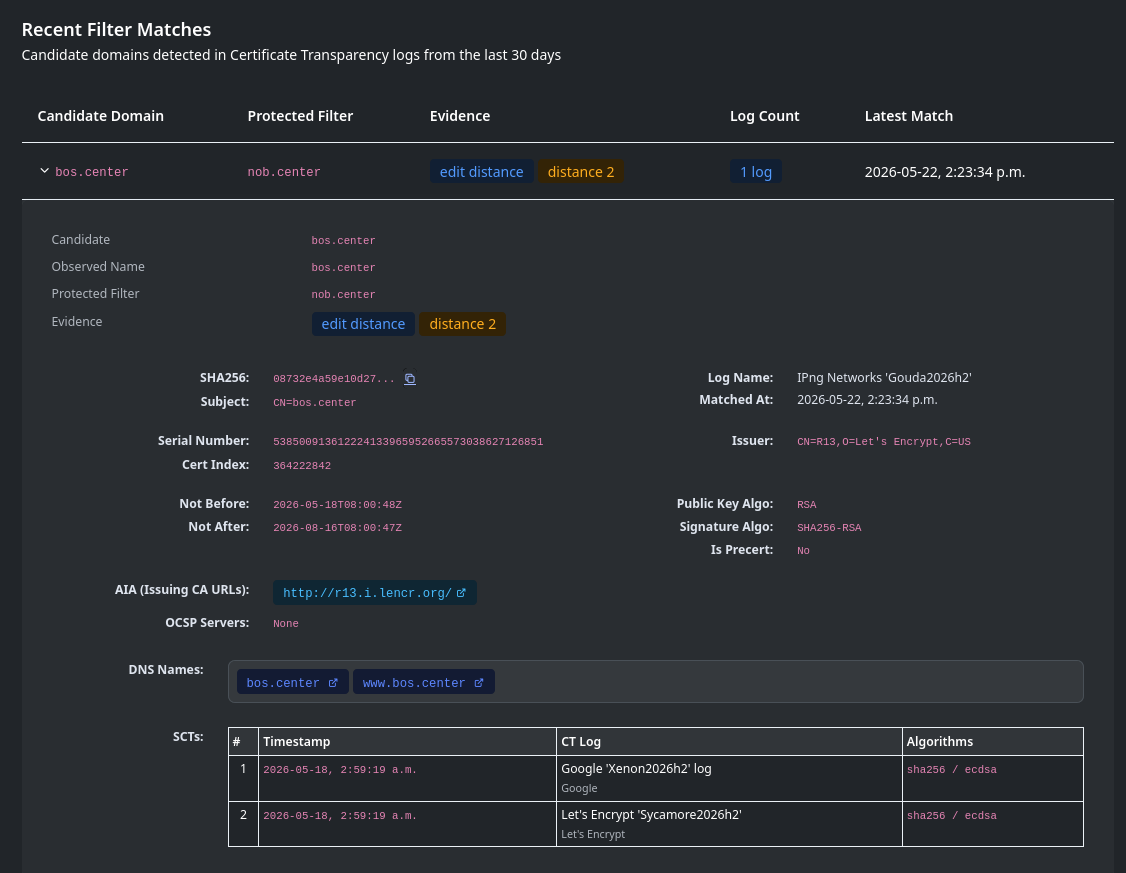
- Recent Filter Matches shows candidate domains detected within the past 30 days. Repeated appearances of the same certificate are grouped so you can expand a match and see the CT logs where it appeared.
Each match includes the protected filter, the suspicious candidate domain, and evidence explaining why it matched.
| Evidence | Meaning |
|---|---|
| TLD change | The protected domain label appeared under another public suffix |
| Confusable characters | Lookalike character substitutions, including common ASCII variants and visually similar internationalized-domain characters |
| Affix | Extra text added at the start or end of a domain label, such as support-example |
| Hyphenation | Hyphens inserted or removed |
| Omission, repetition, or transposition | Common typing mistakes |
| Edit distance | A bounded label similarity check used for longer protected domain labels |
Expand a match to see the observed certificate name, edit distance when present, CT log occurrences, and the same certificate fields shown in the CT Log Monitor certificate detail view.
Internationalized domains can carry extra visual evidence when a candidate resembles a protected filter through lookalike Unicode characters. Those evidence labels can call out script mixing, mixed number systems, unsafe/invisible label characters, or a whole-script lookalike. They are still tied to a candidate that resembles one of your protected domains; this page does not list every unusual IDN seen in CT logs.
Note
A typosquatting match is a review signal, not proof of abuse. Legitimate domains, redirects, certificates issued for parked domains, and domains owned by your organization may still need investigation before escalation.
API reference
All CT-Log endpoints require authentication. See Authentication.
GET /api/ct-log/typosquatting/filters
List enabled CT filters shown on the Typosquatting page, including typosquatting status and eligibility details.
Permission: view_monitoring
Query parameters: page (int, default 1), page_size (int, default 10), sort_by (pattern, match_type, typosquat_enabled; default pattern), sort_order (asc/desc, default asc)
GET /api/ct-log/typosquatting/matches
List recent grouped typosquatting matches from the past 30 days.
Permission: view_monitoring
Query parameters: page (int, default 1), page_size (int, default 20), sort_by (candidate_domain, filter_pattern, evidence, log_count, detected_at; default detected_at), sort_order (asc/desc, default desc)
GET /api/ct-log/typosquatting/matches/{sha256}
Get one grouped typosquatting match with its certificate details and CT log occurrences.
Permission: view_monitoring
Query parameters: filter_id (int, required), candidate_domain (string, required)