Certificate Transparency Monitoring
Monitoring Module CT Log
Every TLS certificate issued by a public certificate authority must be submitted to one or more Certificate Transparency logs — public, append-only registers that anyone can read. This system was designed to make unauthorized certificate issuance detectable by the domain owner.
NOB.center monitors these logs continuously and notifies you whenever a certificate appears that matches your domains.
For details on log types, enabled and disabled logs, and what a lagging log means, see CT Log Status.
How it works
- You configure one or more domain filters — patterns like
example.comor*.example.com— describing the domains you own or care about. - NOB.center watches all major public CT logs in real time.
- When a new certificate is published containing a domain name that matches one of your filters, it appears in your CT-Log feed within minutes.
- For each match, NOB.center also checks the domain's CAA records to determine whether the issuing CA was authorized.
- Your alert rules evaluate each match and dispatch notifications if conditions are met.
Domain filters
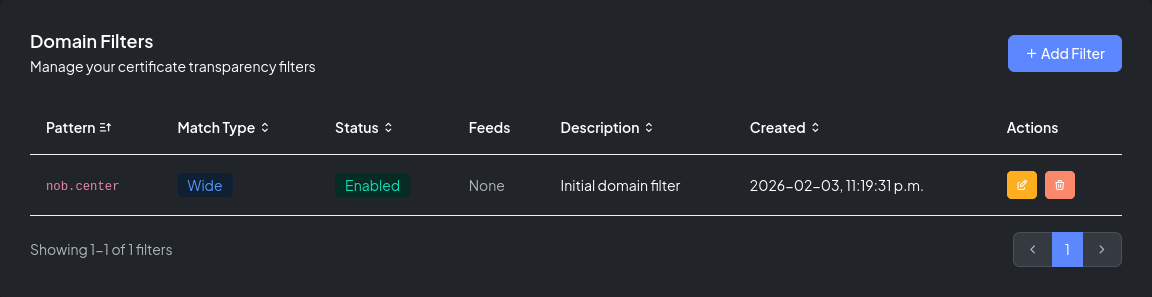
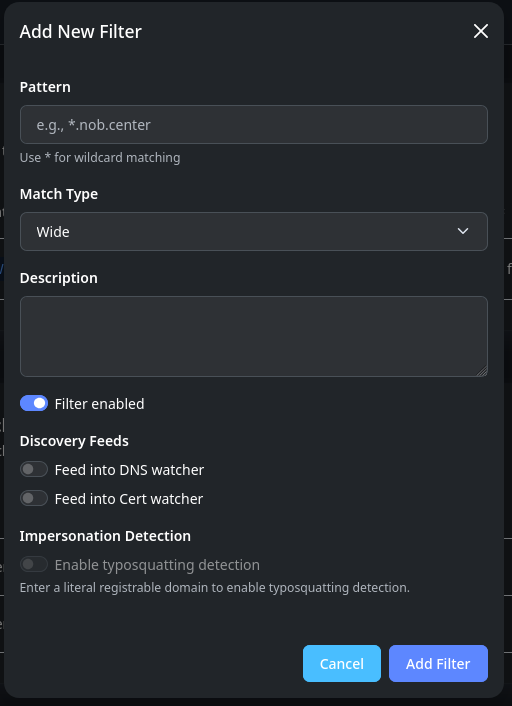
Filters are the core configuration unit of this module. Each filter has:
- Pattern — the domain or hostname to watch
- Match type —
wideorexact - Enabled toggle
- Description (optional)
- Feed options — automatically route matched domain names into other modules
- Typosquatting detection toggle — opt eligible filters into lookalike-domain checks
Wide vs. exact match
| Match type | Pattern | Matches | Does not match |
|---|---|---|---|
| Wide | example.com |
example.com, www.example.com, api.example.com |
notexample.com |
| Exact | example.com |
example.com only |
www.example.com |
Use wide for root domains you own. Use exact when you need to track a specific hostname without catching all subdomains.
Filter feeds
Each filter has two optional feed toggles:
- Feed into DNS Watcher — when a new subdomain appears in a matching certificate, it is automatically proposed as a DNS record to monitor
- Feed into Cert Watcher — newly-seen hostnames are automatically proposed for certificate deployment monitoring
Feeds are useful for maintaining coverage as your infrastructure grows — new subdomains discovered via CT logs flow into your other monitoring modules without manual intervention.
Typosquatting detection
Eligible CT filters can also seed lookalike-domain checks. Use the Add Filter or Edit Filter form on this Monitor page to turn Typosquatting Detection on for a protected domain.
See Typosquatting Detection for the filter eligibility rules and the workflow for reviewing lookalike-domain matches.
Certificate matches
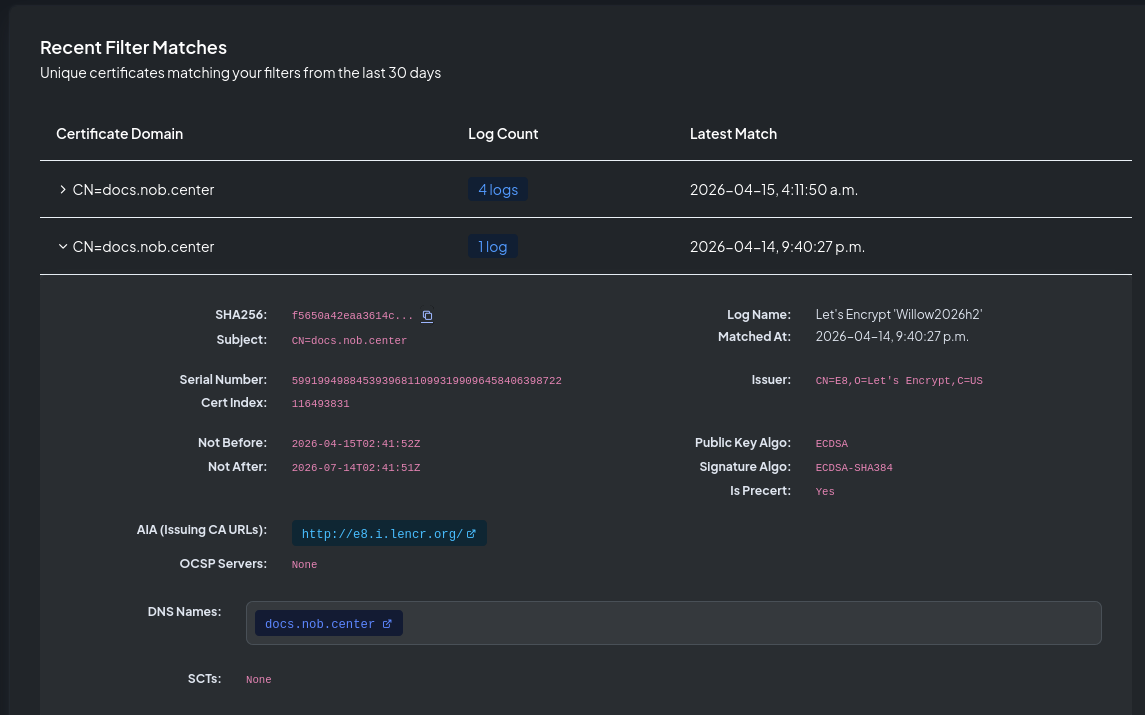
The Certificate Matches section shows all certificates observed in CT logs that matched at least one of your filters within the past 30 days.
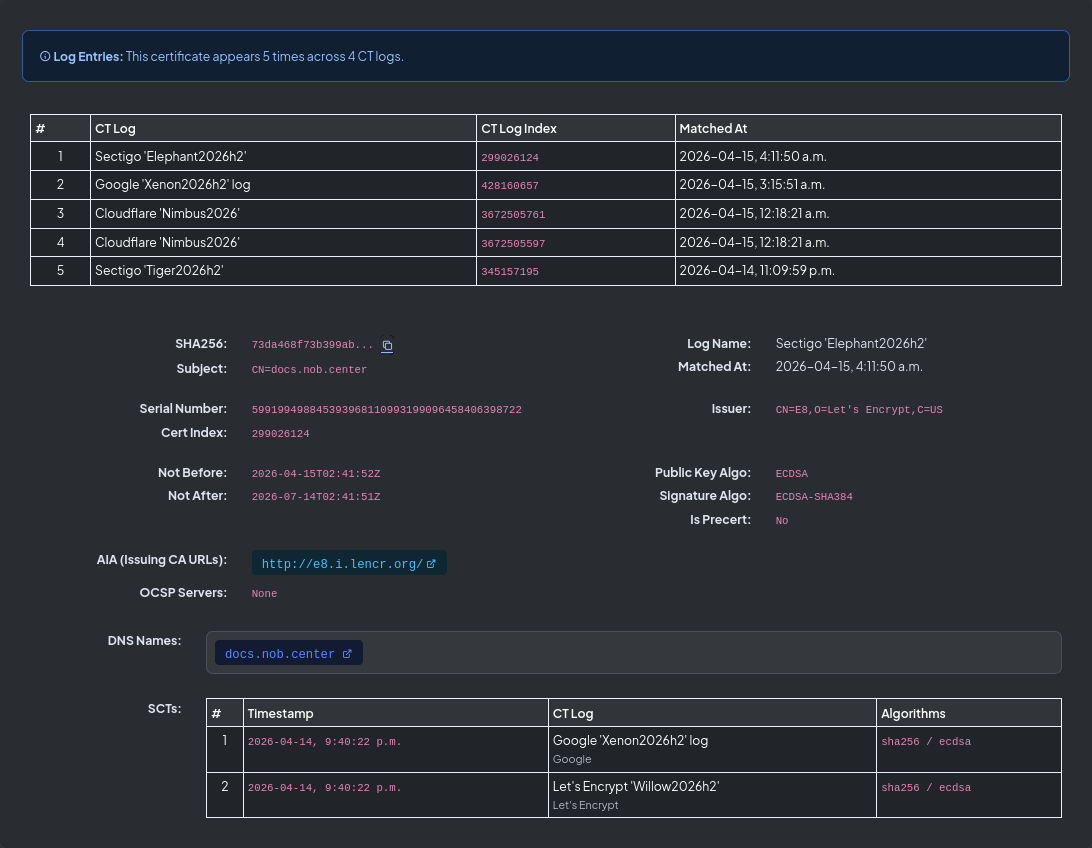
Each row shows the primary domain name, how many CT logs the certificate appeared in, and the most recent match timestamp. Click any row to open the certificate detail view:
| Field | Description |
|---|---|
| Subject | The certificate's Common Name |
| Issuer | The certificate authority that issued it |
| DNS names | All Subject Alternative Names (SANs) |
| SHA-256 fingerprint | Unique identifier for this certificate |
| Serial number | Serial as assigned by the CA |
| Valid from / until | Validity period |
| Signature algorithm | e.g. SHA256WithRSA, ECDSA |
| Key algorithm & size | e.g. RSA 2048, EC P-256 |
| Precertificate | Whether this is a precert or the final certificate |
| CT log | Which log this entry came from |
| Log index | Position in the CT log |
| CA Issuer URLs | Links to the issuing CA's certificate |
| OCSP servers | Online Certificate Status Protocol endpoints |
| SCTs | Signed Certificate Timestamps embedded in the certificate |
CAA checking
For every certificate match, NOB.center checks whether the issuing CA was authorized by the domain's CAA DNS records.
A CAA record (Certification Authority Authorization) is a DNS record that restricts which certificate authorities may issue certificates for a domain. For example:
example.com.  CAA  0 issue "letsencrypt.org"
example.com.  CAA  0 issue "digicert.com"
This record set permits only Let's Encrypt and DigiCert to issue certificates for example.com. Any certificate from another CA would be a CAA violation.
NOB.center reports in the CEL context:
caa.has_records— whether any CAA records existcaa.authorized— whether the issuing CA is in those recordscaa.records— the actual CAA issuance values foundcaa.issuer_candidates— the CA names derived from the certificate's issuer field
A certificate where caa.has_records == true and caa.authorized == false indicates a potential policy violation.
Note
CAA is checked against the domain's current DNS at observation time. A violation could mean the CA ignored the record, or the record was added after the certificate was already issued. Always investigate the context before drawing conclusions.
Alert rules
Navigate to Certificate Transparency → Alert Rules to create and manage rules for this module.
CEL context object
Each CT-Log match exposes the following fields to your CEL conditions:
{
  "cert": {
    "subject": "CN=www.example.com",
    "issuer": "CN=R10, O=Let's Encrypt, C=US",
    "dns_names": ["www.example.com", "example.com"],
    "sha256": "a1b2c3d4e5f6...",
    "serial": "03:ab:cd:ef:01:23",
    "not_before": "2026-01-01T00:00:00Z",
    "not_after": "2026-04-01T00:00:00Z",
    "signature_algorithm": "SHA256WithRSA",
    "key_algorithm": "RSA",
    "key_size": 2048,
    "is_precert": false,
    "log_name": "Google 'Xenon2026h1'",
    "log_index": 123456789,
    "aia_issuing": ["https://r10.i.lencr.org/"],
    "ocsp_servers": ["http://r10.o.lencr.org/"],
    "scts": [
      {
        "log_id": "abc123...",
        "timestamp": "2026-01-01T00:00:00Z",
        "version": 1,
        "hash_algorithm": "SHA256",
        "signature_algorithm": "ECDSA"
      }
    ]
  },
  "caa": {
    "has_records": true,
    "authorized": true,
    "records": ["letsencrypt.org"],
    "error": "",
    "checked_names": ["example.com"],
    "issuer_candidates": ["letsencrypt.org"],
    "evaluated_at": "2026-01-15T10:30:00Z"
  },
  "rate": {
    "count": 3,
    "window": "1h",
    "precert_count": 2,
    "final_count": 1,
    "total_count": 4
  },
  "filter_id": 42,
  "matched_at": "2026-01-15T10:30:00Z"
}
cert fields
| Field | Type | Description |
|---|---|---|
subject |
string | Certificate subject (Common Name) |
issuer |
string | Full issuer distinguished name |
dns_names |
list | All Subject Alternative Names |
sha256 |
string | SHA-256 fingerprint |
serial |
string | Serial number |
not_before |
string | Validity start (ISO 8601) |
not_after |
string | Expiry (ISO 8601) |
signature_algorithm |
string | e.g. SHA256WithRSA |
key_algorithm |
string | e.g. RSA, EC |
key_size |
int | Key size in bits (RSA/DSA only) |
is_precert |
bool | true if this is a precertificate |
log_name |
string | CT log the entry came from |
log_index |
int | Position in the CT log |
aia_issuing |
list | CA Issuer URLs |
ocsp_servers |
list | OCSP responder URLs |
scts |
list | Signed Certificate Timestamps |
caa fields
| Field | Type | Description |
|---|---|---|
has_records |
bool | Whether any CAA records exist for the domain |
authorized |
bool | Whether the issuing CA is permitted by CAA |
records |
list | CAA issuance values found |
error |
string | Any error during CAA lookup; empty if none |
checked_names |
list | Domain names checked for CAA |
issuer_candidates |
list | CA names derived from the certificate issuer |
evaluated_at |
string | When the CAA check was performed |
rate fields
| Field | Type | Description |
|---|---|---|
count |
int | Certificates matching your filter in the current window |
window |
string | Time window, e.g. "1h" |
precert_count |
int | Precertificates seen in the window |
final_count |
int | Final certificates seen in the window |
total_count |
int | Combined count across all certificate types |
Other fields
| Field | Type | Description |
|---|---|---|
filter_id |
int | ID of the filter that matched this certificate |
matched_at |
string | When the match was observed |
Example rules
Certificates from unexpected issuers:
!cert.issuer.contains("Let's Encrypt") && !cert.issuer.contains("DigiCert")
Wildcard certificates:
cert.dns_names.exists(n, n.startsWith("*."))
CAA authorization violation:
caa.has_records && !caa.authorized
Unusual issuance rate:
rate.count > 5
Many SANs (potential bulk issuance):
size(cert.dns_names) > 20
API reference
All CT-Log endpoints require authentication. See Authentication.
GET /api/ct-log/filters
List your organization's domain filters.
Permission: view_monitoring
Query parameters: page (int, default 1), page_size (int, default 10), sort_by (pattern, match_type, enabled, description, created_at, updated_at; default pattern), sort_order (asc/desc, default asc)
Response:
{
  "filters": [
    {
      "id": 1,
      "pattern": "example.com",
      "match_type": "wide",
      "enabled": true,
      "description": "Main domain",
      "feed_dns_enabled": true,
      "feed_certs_enabled": false,
      "typosquat_enabled": true,
      "typosquat_eligible": true,
      "typosquat_ineligible_reason": "",
      "created_at": "2026-01-01T00:00:00Z"
    }
  ],
  "total": 1,
  "page": 1,
  "page_size": 10,
  "sort_by": "pattern",
  "sort_order": "asc"
}
GET /api/ct-log/filters/{filter_id}
Get one organization-owned filter by id. The edit form uses this endpoint directly instead of fetching a large filter page and searching client-side.
Permission: view_monitoring
Response: A single filter object with the same fields returned by the list endpoint.
POST /api/ct-log/filters
Create a new filter.
Permission: create_monitoring
Body:
| Field | Type | Required | Description |
|---|---|---|---|
pattern |
string | Yes | Domain pattern |
match_type |
string | Yes | wide or exact |
enabled |
bool | No | Default true |
description |
string | No | — |
feed_dns_enabled |
bool | No | Route to DNS Watcher |
feed_certs_enabled |
bool | No | Route to Cert Watcher |
typosquat_enabled |
bool | No | Enable lookalike-domain detection for an eligible literal registrable domain |
Response: {"id": 42, "message": "Filter created", "quota_remaining": 8}
PUT /api/ct-log/filters/{filter_id}
Update an existing filter. Accepts the same fields as the create endpoint (all optional).
Permission: update_monitoring
Response: {"message": "Filter updated"}
DELETE /api/ct-log/filters/{filter_id}
Delete a filter. The filter is soft-deleted and stops matching immediately.
Permission: delete_monitoring
Response: {"message": "Filter deleted"}
GET /api/ct-log/matches
List certificates matching your filters (past 30 days).
Permission: view_monitoring
Query parameters: page (int, default 1), page_size (int, default 20), sort_by (certificate_domain, log_count, matched_at; default matched_at), sort_order (asc/desc, default desc)
GET /api/ct-log/matches/{sha256}
Get full detail for a specific certificate by SHA-256 fingerprint.
Permission: view_monitoring
Query parameters: log_name (string, optional — filter to a specific CT log)
GET /api/ct-log/matches/check-new
Lightweight poll to check whether new matches have arrived since a given timestamp.
Permission: view_monitoring
Query parameters: since (string, ISO 8601 timestamp)
Response: {"has_new": true, "count": 3, "latest_timestamp": "2026-01-15T11:00:00Z"}
GET /api/ct-log/introspection
Returns the CEL variable schema for this module, used by the rule editor's Available fields dropdown.
Permission: view_alert_rules