CA Dependencies
Certificate Deployment Cert
CA Dependencies shows which certificate authorities your services rely on, how Firefox and Chrome trust checks assess their certificates, and which endpoints need attention when a chain or trust decision changes.
This page is part of Certificate Deployment Monitoring. Open Certificate Watcher → CA Dependencies, or select CA Dependencies from the certificate monitor page. It uses your existing monitors and scan evidence; there is nothing extra to configure.
Use it to answer three practical questions:
- Will users encounter certificate warnings? Compare browser results and trace a failed check to the affected certificate and endpoint.
- Which services share a dependency? Start with a root or intermediate CA and expand down to the services using it.
- How exposed are we to a CA change? Review concentration and alternative paths before a migration, renewal or trust-store update.
How browsers establish trust
From your certificate to a trusted authority
A website presents a leaf certificate, usually accompanied by intermediate CA certificates. The browser tries to build a validation path from that leaf to a trust anchor it already accepts:
Website certificate → issuing intermediate CA → trusted root CA
There can be more than one intermediate. Each issuer's public key verifies the signature on the certificate below it. Certificate dates, permitted uses and restrictions must also pass the applicable checks. These are the foundations of certificate path validation.
The root is the starting point of trust. A browser accepts it because its root program has approved it for the relevant purpose, not simply because the root has signed itself. A root can remain valid as a certificate while no longer being accepted for websites. Mozilla, for example, records separate trust permissions for website and email certificates in its root store.
The browser also checks the identity of the website. For shop.example.com, the leaf certificate must cover that hostname in its Subject Alternative Names (SANs). A familiar CA name or a matching-looking certificate subject does not replace this check. See TLS service identity.
Why there can be several paths
The chain sent by the server supplies evidence for path building; it does not decide what the browser trusts. Clients can have different issuer certificates available and can find different routes to an accepted anchor.
Cross-signing helps explain many alternative routes: a CA's public key can appear in certificates signed by different issuers. Those certificates can lead to different roots, even when their subject names look the same. They remain distinct certificates with their own fingerprints, validity periods and restrictions.
This matters during CA migrations. One route might stop working while another still reaches an accepted root. A blocked alternative therefore does not automatically mean the website is blocked. The details view separates individual path results from each browser's overall result.
Trust also depends on browser policy
Firefox and Chrome maintain their own root programs. They can accept different anchors or impose different restrictions, such as limiting issuance dates or permitted names. Chrome can also constrain a root using the timestamps in the leaf certificate's transparency receipts. Its root-store FAQ describes these additional controls.
Two other concepts matter when reading the results:
- Revocation withdraws acceptance of a certificate or key before normal expiry. Browsers use several mechanisms to learn about withdrawals. Chrome's CRLSet contains selected blocked certificates and keys; it is not a complete list of every revocation.
- Certificate Transparency (CT) makes public certificate issuance auditable. A Signed Certificate Timestamp (SCT) is a log's signed promise to include a certificate or precertificate. Chrome's CT policy requires an eligible combination of receipts from logs and independent operators. Merely finding an SCT is not enough to establish compliance.
How NOB.center assesses your services
NOB.center starts with what your endpoint actually presented during a TLS scan: its certificate chain and captured transparency evidence. It validates the monitored hostname, builds available paths and applies the supported browser trust checks separately.
| Result column | Reference checks |
|---|---|
| Firefox | Certificate path validation against Mozilla NSS website-trust metadata, plus Mozilla OneCRL matches and supported root restrictions |
| Chrome | Certificate path validation against Chrome Root Store metadata, CRLSet matches, supported root restrictions, SCT signature verification and Chrome CT policy checks |
| Custom | Independent validation using the custom CA roots configured on the monitor |
These checks provide a practical view of likely browser acceptance and explain where the available evidence fails. They do not run an actual copy of each browser. Local enterprise roots, browser versions, update timing, additional browser policies and certificates cached by a user's browser can produce different results. A custom CA result describes your configured trust; it does not install that CA in anyone's browser.
Our revocation checks use selected lists rather than comprehensive live CRL or OCSP checking. SCT signatures are verified, but this does not prove that a log fulfilled its promise to include the certificate. Requirements that cannot be established from available evidence remain Unknown. The certificate trust reference describes these checks in more detail.
Read the dependency map
Start with By Root for an overview of your CA dependencies. Expand a branch to follow:
Root CA → intermediate CA(s) → leaf certificate → monitor → endpoint
The Type column distinguishes certificates from the monitor and network endpoint. An endpoint is an IP address and port; one monitor can have several endpoints. That distinction helps you spot a server that presents a different certificate from its peers.
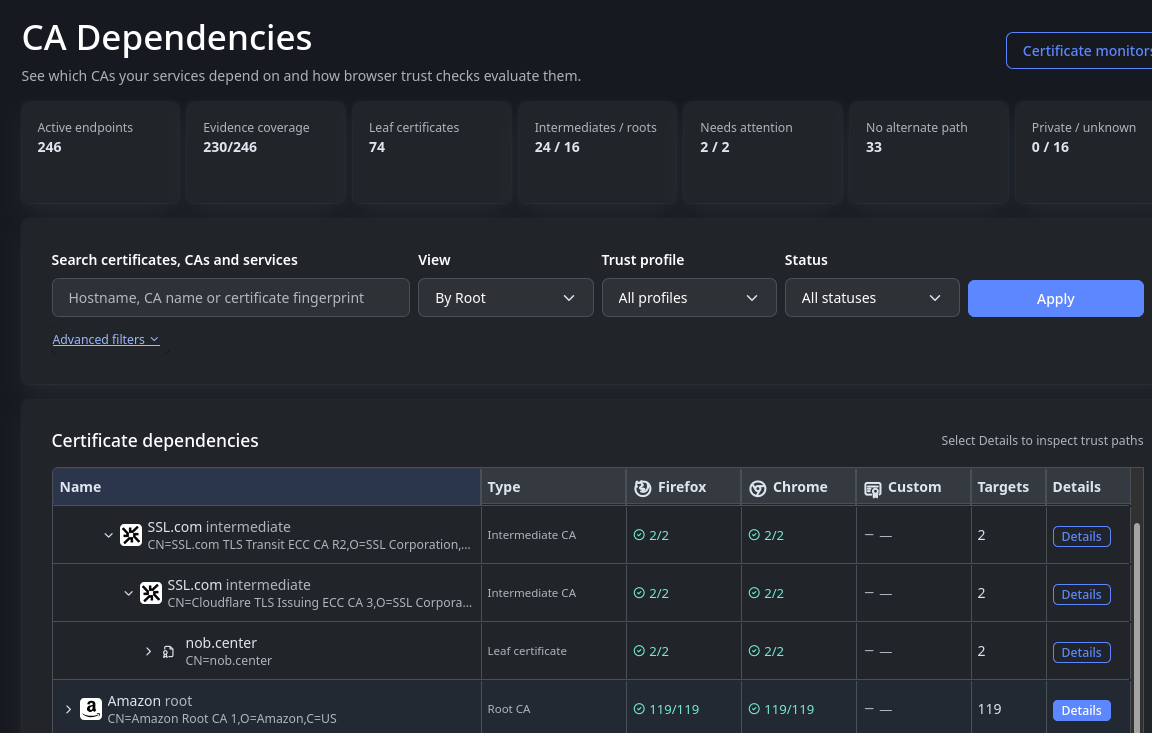
Select a screenshot to open it at full size.
Understand coverage before interpreting results
The cards above the grid describe your monitored endpoints and their recorded evidence:
| Card | How to use it |
|---|---|
| Active endpoints | The number of IP-and-port targets attached to enabled monitors in the current filter scope |
| Evidence coverage | Endpoints with usable certificate evidence out of active endpoints. Coverage means evidence is available, not that those certificates are trusted. |
| Leaf certificates | Distinct leaf certificates. Several endpoints can serve the same certificate. |
| Intermediates / roots | Distinct CA certificates found in the evidence and evaluated paths |
| Needs attention | Endpoint counts for Firefox / Chrome with a blocked or invalid result. These are two browser counts, not a fraction. |
| No alternate path | Endpoints with only one distinct trusted path currently recorded in the selected scope. This is a reason to review dependencies, not a prediction of an outage. |
| Private / unknown | Endpoints trusted by configured custom roots / endpoints whose public assessment is unknown |
In the overview screenshot, 230/246 means 230 endpoints have usable evidence and 16 do not. It does not mean that 230 passed validation. Needs attention 2 / 2 means two endpoints need review for Firefox and two for Chrome; they may be the same endpoints.
Interpret browser columns at the right level
At an endpoint, the Firefox, Chrome and Custom columns show that endpoint's individual outcomes. At a CA, leaf or monitor row, a value such as 119/119 summarizes associated endpoints: all 119 passed that browser's reference checks. Hover over the value for the breakdown of trusted, invalid, blocked, unknown and not-applicable results.
A green CA row summarizes its associated services. It does not declare that every certificate issued by that authority is trusted. The same CA certificate may also occur in several branches without representing additional endpoints.
CA names and logos help you recognize providers. The subject below the name identifies the particular certificate; Details shows recorded ownership and technical fields. Older subject names can remain after ownership or branding changes, so an Amazon-branded row may still have a Starfield subject. A generic certificate icon means a brand could not be established; it is not a trust verdict.
Choose a starting point
- By Root answers “Which services depend on this trust anchor?”
- By Intermediate answers “Where is this issuing CA used?”
- By Service starts with a monitor, then its endpoints and presented leaf certificates. Use it to investigate one service or compare its IP targets.
Search for a hostname, CA name or certificate fingerprint to find matching rows. Select a Trust profile and Status, then click Apply to focus on a browser, services needing attention, unknown results or private-only trust. An Unresolved group keeps endpoints with missing evidence or incomplete paths accessible for investigation.
Search narrows the dependency results. The profile, status and advanced fingerprint filters also scope the summary and concentration views. Advanced filters accepts an exact root or intermediate SHA-256 fingerprint when you need to distinguish similarly named or cross-signed certificates.
Investigate a browser result
Open Details on a row, double-click it, or select it and press Enter. The modal keeps you in the same place in the dependency map when you close it.
Read the details in this order:
- Browser results. The Firefox Trust, Chrome Trust and Custom CA Trust cards summarize the associated endpoints. For a group, drill down to its monitored endpoints to see individual results.
- Known validation paths. Expand a chain to follow its certificates from leaf toward the trust anchor. Browser labels and endpoint counts show which outcomes belong to that chain. Main path marks a selected accepted path.
- Failure explanation. Read which check failed and which certificate it affects. Where available, the explanation includes the recorded issuance/SCT cutoff, permitted names or browser-version conditions. A root's SCT restriction can fail because of the leaf's receipts; the highlighted leaf identifies that distinction.
- Monitored endpoints. Check the IP and port, Expected hostname, and individual browser results. Follow the monitor link to investigate its scan history.
| Result | Meaning and next step |
|---|---|
| Trusted | At least one available path passed the supported checks with usable reference data. Review concentration and alternatives if you are assessing resilience. |
| Blocked | An explicit trust restriction or block-list match prevents acceptance through the available paths for that profile. Inspect the affected certificate and source. |
| Invalid | Validation established a problem, such as a hostname mismatch, expiry, unusable issuer chain or insufficient Chrome CT compliance. Use the explanation to decide what to correct. |
| Unknown | Evidence, current reference data or a supported policy interpretation is missing. Check coverage, source freshness and observation time before treating it as a certificate failure. |
| Not applicable | That trust profile does not apply, for example when no custom CA is configured or a fully private certificate has no applicable public-browser profile. |
These labels apply both to individual paths and to broader results. A blocked path can coexist with a trusted endpoint. Read the browser's overall result before deciding that users will receive a warning.
Example: a blocked path with a trusted alternative
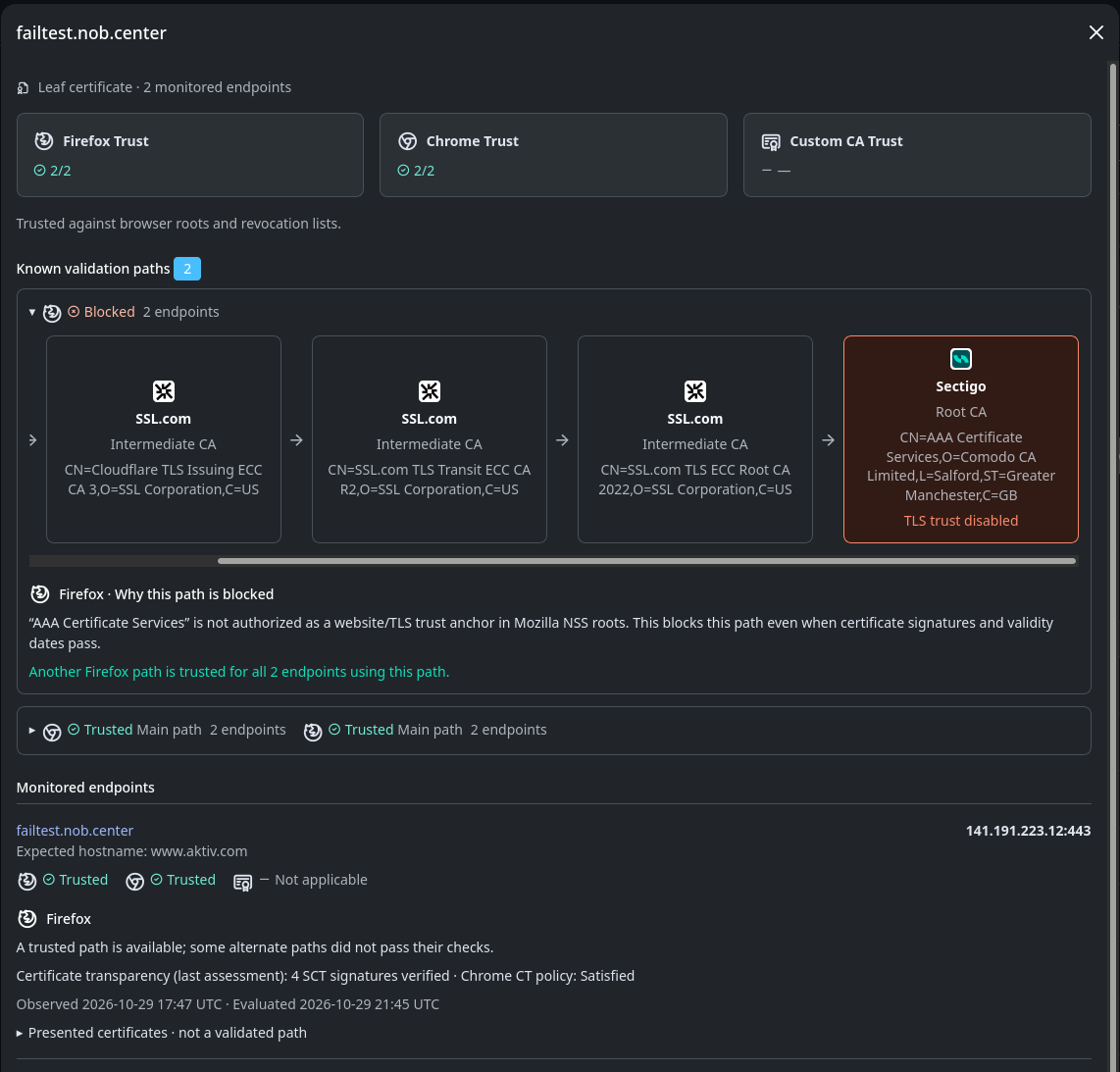
In this screenshot, both browser cards show 2/2, and both monitored endpoints are trusted. Expanding the first known path reveals a Firefox route ending at AAA Certificate Services, marked TLS trust disabled. Its signatures and certificate dates are not sufficient to make that root an accepted website trust anchor.
The explanation identifies the failed Mozilla trust permission and confirms that another Firefox path is trusted for both endpoints. The second chain is accepted by Chrome and Firefox. There are two distinct known chains, not four endpoints, and the blocked alternative does not overturn the accepted route.
Use this distinction when reviewing old cross-signed chains after a CA migration. A failing alternative can explain a difference between clients or expose a dependency worth reviewing, while a working route preserves the current reference result.
Presented certificates · not a validated path shows the server's observed chain separately. Use it to inspect what was sent, especially when path building failed. Sending a certificate does not make it a trusted issuer. Exact hashes, subjects and other raw fields are available in Technical certificate details when you need to compare certificates with your provider.
Measure your exposure with CA concentration
The concentration table answers “How many of our endpoints use this CA certificate?” Root CAs appear first, with intermediates collapsed beneath their immediate issuer on known paths. Expand a root to see which issuing intermediates account for the dependency. Cross-signed routes can place a certificate under more than one ancestry; counts remain per certificate.
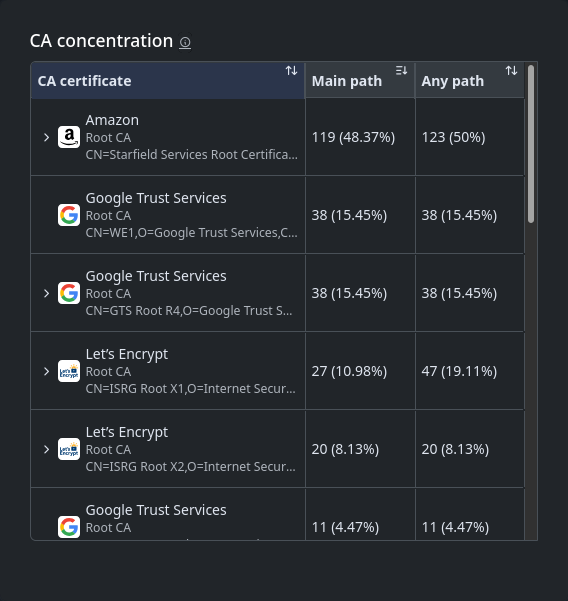
Main path counts distinct endpoints whose selected path uses the CA certificate. Any path counts distinct endpoints associated with it across known alternatives or observed CA evidence, including paths that did not pass validation. Read it as broader exposure, not an extra set of trusted services.
In the screenshot, Amazon has 119 (48.37%) on the main path and 123 (50%) on any path. Nearly half the 246 active endpoints use that exact CA certificate on their main path; four more are associated with it outside the selected path. Let's Encrypt's 27 main / 47 any similarly shows that its certificate appears beyond the main route for 20 endpoints.
The table is sorted by Main path descending initially. Click a column heading to change the sort. For All profiles, main-path counts prefer a trusted Firefox path, then a trusted Chrome path, then a custom path. Select a specific trust profile when assessing that browser's dependencies.
Percentages use the active endpoint count in the current filter scope. They are not shares of CA revenue, certificate issuance or distinct hostnames. Do not add parent and intermediate counts together: an endpoint can depend on every CA certificate in its chain, and rows with the same brand can represent different certificates.
Use a large main-path count to prioritize a migration review. Use a larger any-path count to look for less obvious dependencies and alternatives. Neither number alone predicts how many services would fail if a CA were removed: another accepted path may keep a service working, and some listed alternatives already fail their checks.
Understand freshness and changing results
Browser trust data shows the root, revocation-list and Chrome CT log-list versions used as references, with confirmation times in UTC. Sources normally refresh every 15 minutes. CA ownership metadata refreshes daily and affects names and branding, not trust decisions.
A recent successful TLS scan can still have an Unknown browser result if required trust data becomes unavailable or stale. Check this panel when many unrelated endpoints change at once. Using cached data means the latest refresh failed but previously validated data is still usable. Once its freshness or expiry limit is exceeded, the affected result becomes unknown rather than continuing to appear trusted.
The modal distinguishes two times:
- Observed is when NOB.center actually connected to the endpoint and captured evidence.
- Evaluated is when that evidence was most recently assessed against reference trust data.
A browser trust update can therefore change a result without your server presenting a new certificate. NOB.center reevaluates cached evidence without opening another TLS connection or adding a network-scan history entry. If you recently changed the deployed chain, use the observation time to establish whether the page has seen it yet. Missing or outdated evidence is refreshed by ordinary scans.
Use the page during a review
| Your question | Where to start | What to establish |
|---|---|---|
| “A browser warns about this service.” | Search the hostname, choose By Service, then open endpoint details. | Which IP and port were observed, whether the hostname matches, which check failed, and whether another path passes |
| “Our provider is replacing an intermediate.” | Choose By Intermediate or use its exact fingerprint. | Which monitors and endpoints use that particular certificate, including alternative routes |
| “Could a CA trust change affect us?” | Sort concentration by Main path, choose the browser profile and inspect the largest dependencies. | The affected certificate, main versus broader exposure, and any accepted alternatives |
After correcting a deployment, check that a later Observed time reflects the new certificate or chain. Then review the endpoint's browser results again. For monitor configuration, custom roots, scan history and alert rules, return to Certificate Deployment Monitoring.